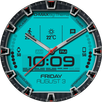
Venom Watch Face fits users who want a clear digital watch layout with useful data always in view. It supports fast interaction for everyday tasks, while still keeping the design clean and readable. You can configure settings on the watch or through the Wear OS app on your phone, and weather plus phone battery can sync through the companion phone app. As a result, it works well for daily routines and short checks on the wrist. Venom Watch Face APK is suitable for users who prefer flexible setup and control.
Venom lets you tailor colors, date formats, ambient modes such as eco, black and white, or full, and background styles. You can blend design elements to match your watch and outfit, then adjust what is shown to fit your routine. Configuration is available on the watch and also in the Wear OS phone app, so changes are easy to make when needed.
Rich data at a glanceDay and month are displayed clearly, along with watch battery, phone battery, and local weather. You can add optional indicators through complications, including steps, heart rate, unread Gmail, and more, depending on what your device supports. Weather and phone battery sync through the companion phone app, and indicators update based on defined refresh settings.
Tap to interactYou can tap widgets to open detailed views or switch which data is displayed, which helps reduce swipes and menu browsing. Venom supports up to four shortcuts, so you can launch favorite apps right from the watch face. This tap interaction is designed to be quick, making simple actions easier while your hands are busy.
Smarter timekeepingVenom supports 12 or 24 hour formats and an optional leading zero for the digital display. Seconds can be shown as dots, which adds precision without cluttering the layout. A secondary timezone is available as a premium option for users who track another region or work across locations.
Flexible controls and on watch managementRefresh rates for heart rate and weather can be set to fit your needs, and you can show or hide brand text, shortcuts, and indicators. Interactive mode duration is configurable, so taps remain responsive for an interval that suits your usage. On devices that support the latest Wear OS features, you can manage complications and shortcuts directly on the watch with a simple MANAGE button.
Configuration can be done on the watch or through the Wear OS app on your phone, which helps if you prefer a larger screen for setup. Weather and phone battery data require the companion phone app to sync information to your watch face. Venom is available with free options and premium upgrades, and premium unlocks extra items such as replacing the title text, more background styles, dual timezone, and expanded indicators.
Start with a basic setup, then adjust the design and data to suit your routine. If you choose to download Venom Watch Face, you can finish configuration in a few quick steps.
Venom Watch Face focuses on clear time, quick taps, and data you can see without digging into menus. For users who prefer regular updates, Venom Watch Face latest version provides options for both casual and detailed setups.
For official support and more information, visit the developer website:
Latest Version
1.26.09.0501Uploaded by
Masaharu Hamada
Requires Android
Android 7.0+
Category
Free Personalization AppContent Rating
Everyone
Report
Flag as inappropriateLast updated on Sep 5, 2026
2.26.09.0501
- Fix startup crash
- Bump wear compatibility target to 35
- Bump mobile compatibility target to 36
- Fix wear app install status
- Bump library versions
Requires app update on both Watch & Mobile.
If you have any issue, please let me know by email at thema.apps@gmail.com



APKPure - A multi-platform app store primarily focused on Android, providing extensive app-related content. Discover the app you want easier, faster, and safer, with quick and efficient downloads and installations.