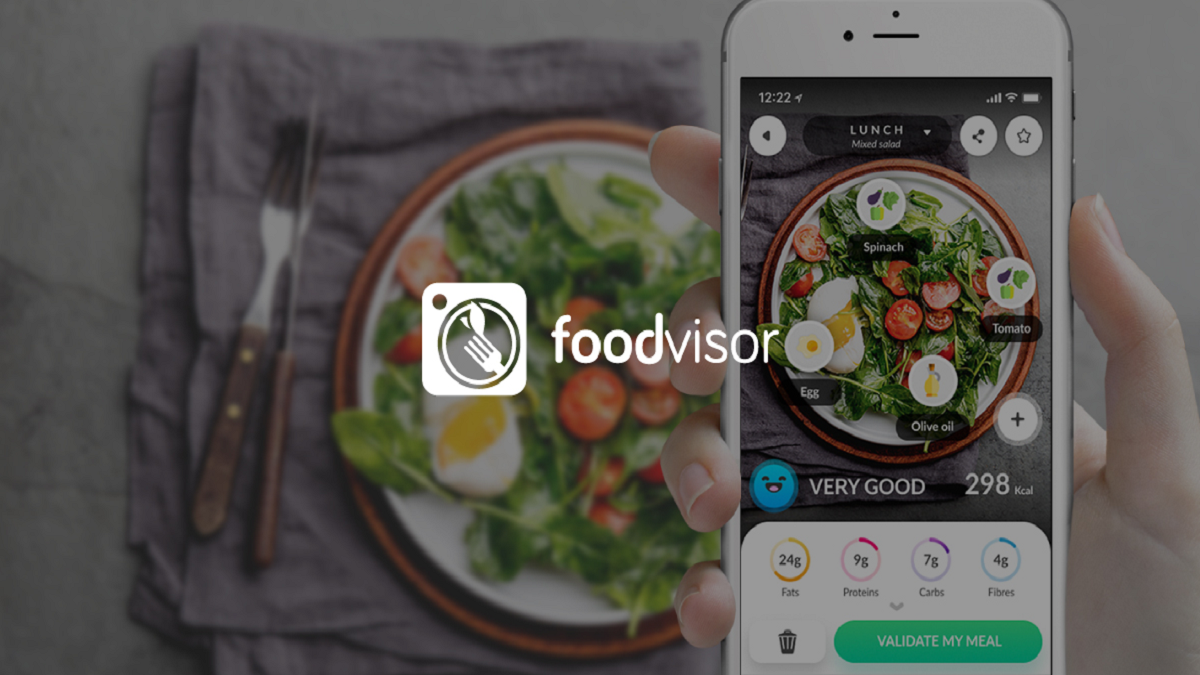

Foodvisor fits daily situations where you want to understand what you eat without spending too much time writing everything down. It focuses on meal tracking, nutrition goals, and steady habit changes, so you can follow your food intake in a practical way. In addition, the Foodvisor app brings diet guidance, progress views, and activity information into one place for users who want clearer support before they download Foodvisor.
Photo meal logging
Foodvisor lets you take a photo of your meal and uses food recognition to identify items on the plate. It can estimate portions and show nutrition details within a short time, which helps when you do not want to type each food manually. This is useful for common meals, quick lunches, and home cooked dishes where manual logging can feel slow.
Several ways to record food
You can log meals in different ways depending on the situation. Foodvisor supports photo logging, voice input, smart food search, barcode scanning, and saved favorite meals. As a result, you can scan packaged food, repeat a meal you eat often, or search for an item when a photo is not enough.
Calories, macros, and health details
Foodvisor tracks calories and macronutrients such as protein, carbs, and fat. It also follows vitamins, minerals, hydration, weight progress, physical activity, and habit reports. This gives you a wider view of eating patterns instead of only showing a daily calorie number.
Personalized nutrition programs
Foodvisor builds plans around your goals, preferences, habits, and nutrition guidance. The app is designed for gradual changes rather than strict dieting, so it can suit users who want to lose weight while keeping regular meals in their routine. Over time, the program can help you connect daily choices with progress.
Recipes, workouts, and habit motivation
Foodvisor includes recipe suggestions and tailored advice to support meal planning. Premium access can add full meal analysis, personalized programs, workouts, and an ad free experience. To keep daily use more engaging, Foodvisor also includes community support and a seed system that grows as you keep healthy habits.
Foodvisor offers both free and Premium options, which is important to know before installing the Foodvisor APK. The free experience can help users start with meal tracking and basic nutrition awareness. Premium is aimed at users who want deeper analysis, more guided programs, recipes, workouts, and no ads.
If you mainly need a simple food diary, the free option may be enough to test whether the app fits your routine. However, users looking for weight management support may want to compare the Premium tools with their personal goals. This can help you decide whether Foodvisor AI Calorie Counter matches how much guidance you want each day.
Foodvisor may suit users who want faster meal tracking, especially when taking photos or scanning barcodes feels easier than typing long food lists. It can also help users who want to watch calories, macros, hydration, and activity in the same app. For weight loss, the app is most relevant when you prefer steady habit changes instead of very strict food rules.
The app may be less suitable if you only want a basic note taking tool for meals. Since several functions focus on nutrition guidance, plans, and progress reports, Foodvisor works best when you are ready to check your eating patterns regularly. In that case, the Foodvisor latest version can be useful for keeping your tracking routine current.
After installing Foodvisor, start by setting up your profile and choosing your nutrition goal. This helps the app prepare tracking and guidance around your daily needs, and it gives context before you begin using the Foodvisor APK for meal records.
Foodvisor combines meal logging, nutrition tracking, habit reports, and guided programs for users who want a clearer view of their eating routine. If these tools match your needs, you can download Foodvisor and use it to track meals, review progress, and build steadier food habits.
Official information is available from the developer:
Latest Version
7.5.6Uploaded by
Sodoo Sodkoo
Requires Android
Android 9.0+
Category
Free Health & Fitness AppContent Rating
Everyone
Report
Flag as inappropriateLast updated on Oct 1, 2026
In this version, we made some general improvements and squashed a few bugs to make the experience better for all of you. Hope you enjoy these updates!



APKPure - A multi-platform app store primarily focused on Android, providing extensive app-related content. Discover the app you want easier, faster, and safer, with quick and efficient downloads and installations.