Scan Date:Jan 18, 2026
Show More


Gacha Life helps players who want to design characters and build short stories for comics, videos, and social posts. It gives you a focused space to plan casts, script moments, and arrange visuals at your own pace. Because sessions save locally, you can work during commutes or downtime without worrying about a connection. If you like to keep projects organized, the app supports clear profiles and scene planning. To begin, simply download Gacha Life and start shaping ideas into shareable scenes.
Deep character customization
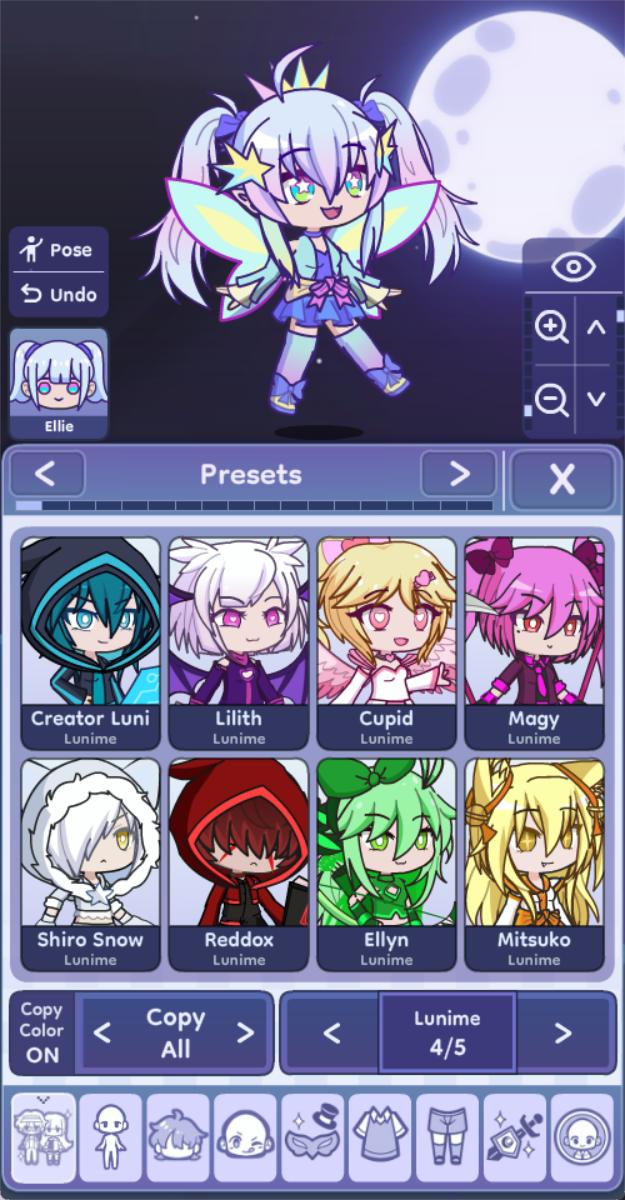
Gacha Life lets you build original characters with thousands of outfits, hairstyles, weapons, and accessories. A Color Slider helps you recolor items so a cast can share a consistent palette or stand out with unique tones. Precise adjust and rotate controls make it easier to place items exactly where you want them.
Large character capacity and profiles
You can create and manage up to 300 Character Slots to support big projects or ongoing series. Each slot can hold a custom profile so you can note roles, relationships, or quick reminders. This structure helps keep main casts, alternates, and seasonal looks organized as your plans grow.
Custom poses with import and export
Gacha Life supports pose creation so characters can match specific actions or moods. You can save favorites, then import or export pose sets to reuse them across different characters and scenes. This approach keeps frequent characters on model and speeds up scene setup.
Studio Mode for scene building
Studio Mode allows up to 16 characters per scene, which makes group dynamics and crowd moments possible. In Gacha Life, you can add dialogue text and choose from over one hundred backgrounds to set location and mood. This combination helps you assemble comics, skits, or short social posts without switching tools.
Gacha Simulator presets
The Gacha Simulator lets you pull and collect 400 preset characters. These presets can serve as design prompts or background cast members when a story needs variety. You can restyle any preset to match your theme and fold them into your ongoing narrative.
For longer series, consider dividing the 300 slots into groups such as main cast, alternates, and seasonal looks. Use character profiles to track personality notes, relationships, and key events so continuity stays clear. As arcs change, update those notes to reflect new roles and keep cross-episode details aligned. This habit reduces retakes when you return to a project after a break.
Define a brand palette for your project and apply it consistently with the Color Slider. Save and export pose sets for recurring characters so body language stays steady across episodes. In Studio Mode, mix wide establishing backgrounds with close-up shots to guide pacing and focus. This balance helps readers follow scene context before moving into detailed dialogue.
When running long sessions or working on older devices, set graphics to Low to reduce lag during heavy scenes. Save work often and organize characters carefully since some users report slot or backup issues in extended projects. Restart the app periodically if you notice slower responses after large edits. These habits help keep production stable on the Gacha Life latest version or earlier builds.
Use this quick guide to move from a blank slate to a shareable scene. It covers character creation, scene setup, and saving your work in a simple flow. If you installed the Gacha Life APK, the steps below outline what to do next.
Open the app and create a new character, then pick base items like hair, outfit, and key accessories.
Adjust colors with the Color Slider and refine item positions with the adjust and rotate controls, then save to a Character Slot.
Repeat for any additional cast members you need for the scene, and set profiles if you plan to reuse them.
Enter Studio Mode, place up to 16 characters, choose a background, and add dialogue text for the moment you want to show.
Preview the layout, make fine adjustments to poses and text, then export or capture the scene for sharing.
Gacha Life focuses on character design and scene storytelling with tools that suit both quick posts and ongoing series. You can build casts, compose scenes, and refine poses without a connection. For easy setup, just download Gacha Life APK latest version from APKPure and begin planning your next project.
Latest Version
0.96Uploaded by
Gabriel Rodrigues
Requires Android
Android 5.0+
Category
Free Casual GameContent Rating
Everyone
Security Report
Report
Flag as inappropriateLast updated on Nov 7, 2025
This release includes minor bug fixes and general improvements. Update to the latest version for the best experience.








APKPure - A multi-platform app store primarily focused on Android, providing extensive app-related content. Discover the app you want easier, faster, and safer, with quick and efficient downloads and installations.