

Geozilla - Family GPS Locator addresses daily situations where parents, caregivers, and trusted groups need to know where someone is with permission. It helps users stay connected through shared location access, map based updates, and safety tools for urgent moments. As a result, families can check routine movement, coordinate pickups, and respond faster when plans change. Users who want to download Geozilla - Family GPS Locator can use it as a location sharing tool built around clear consent.
Live location sharing on a private map
Geozilla - Family GPS Locator lets you view approved family members, friends, elders, or trusted circle members on a live map. The app focuses on shared access, so location viewing starts only after a person joins a circle and allows sharing. This makes it suitable for families that want visibility without hidden tracking.
Private circles with accepted invitations
You can create a trusted circle and invite only the people who should take part. Before any location appears, the invited person needs to accept the request and keep location permission active. In this way, Geozilla supports transparent use between parents, caregivers, and other trusted contacts.
Place alerts for daily routines
Geozilla - Family GPS Locator can send alerts when someone arrives at or leaves saved places such as home, school, or work. These alerts help users follow normal routines without sending repeated messages. For example, a parent can know when a child reaches school, while a caregiver can notice when an elder leaves a familiar place.
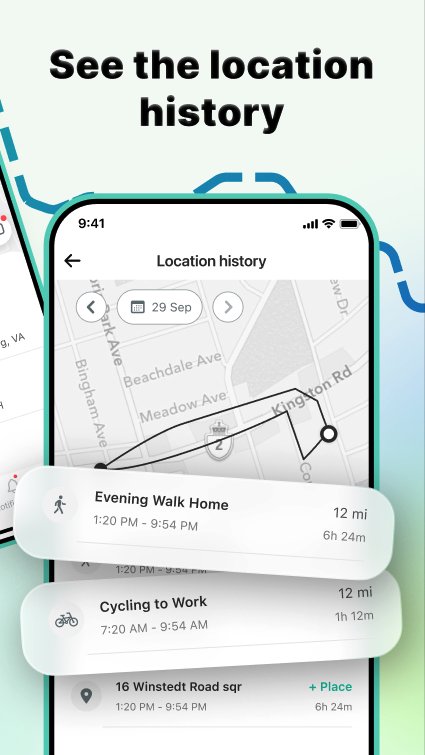
Location history for recent movement
You can review daily movement timelines to understand recent routes and whereabouts. This can be useful when checking whether someone followed a usual path or when trying to remember where a person was earlier in the day. The history view gives families context, rather than only showing the current point on the map.
Emergency alerts and driving safety tools
Geozilla - Family GPS Locator includes SOS alerts, crash detection, and emergency contact notifications for urgent situations. In addition, driver safety reports can highlight speeding, phone use while driving, aggressive driving, and other risky habits. These tools may help families discuss safer driving based on recorded behavior.
Geozilla is designed for family safety with clear permission, not hidden tracking. Each circle member needs to join intentionally, and location sharing depends on active access from that person. This approach is important for families, caregivers, and trusted groups that want shared awareness while respecting personal boundaries.
Before using Geozilla as a Family GPS Locator, users should talk with circle members about why location sharing is needed and when it should stay active. For children, elders, or relatives who need care, this can make expectations clearer. For adult friends or family members, it helps avoid confusion about who can see location information.
Geozilla can also work with GPS tracker devices for items or dependents that need extra attention. Depending on the supported device setup, families may pair trackers with pets, cars, kids’ bags, or wearable devices. This can be helpful when a phone is not the only thing a user wants to keep track of.
Battery monitoring also gives users another point of context during the day. If a family member’s phone battery is low, the circle can understand why location updates may become less frequent. Wear OS compatibility adds another way to stay informed from a smartwatch when checking a phone is not convenient.
Geozilla - Family GPS Locator works best when every member understands the sharing setup before joining. After installing the Geozilla - Family GPS Locator APK on an Android phone, you can set up a circle and use the main safety tools step by step.
Geozilla - Family GPS Locator gives families and trusted groups a way to share location, check routines, and respond to urgent situations with permission from each member. Users looking for the Geozilla - Family GPS Locator latest version can review these functions before deciding whether it fits their family safety needs.
Official information for Geozilla is available through the following channels:
Latest Version
6.86.5Uploaded by
Vitor Lopes
Requires Android
Android 8.0+
Category
Free Lifestyle AppContent Rating
Everyone
Report
Flag as inappropriateLast updated on Oct 7, 2026
GeoZilla is getting better, so update and share your thoughts via support@geozilla.com. Your feedback makes a difference.




APKPure - A multi-platform app store primarily focused on Android, providing extensive app-related content. Discover the app you want easier, faster, and safer, with quick and efficient downloads and installations.











![Magnifier & Microscope [Cozy] APK](https://image.winudf.com/v2/image1/Y29tLmhhbnRvci5Db3p5TWFnX2ljb25fMTc4ODkzNDUxOV8wODk/icon.png?w=102&fakeurl=1)