


How to Chat on Polybuzz

2026-08-04
Discover how to begin chats with AI characters, navigate the UI, utilize voice tools, and craft prompts to receive higher-quality AI responses.
Chatting on Polybuzz is the whole point of the app. You pick an AI character, type a message, and the character responds in its defined personality. The mechanics are straightforward. Getting great conversations out of the AI takes a little more thought. Here's how to start chatting on Polybuzz and how to make those chats better.

PolyBuzz is a character chat app that lets you roleplay and build ongoing stories with memory.
Starting Your First Conversation
After you've downloaded Polybuzz and signed in, you land on the character feed. This is the main discovery screen. Scroll through available characters, tap one that catches your attention, and you're taken to the chat screen.
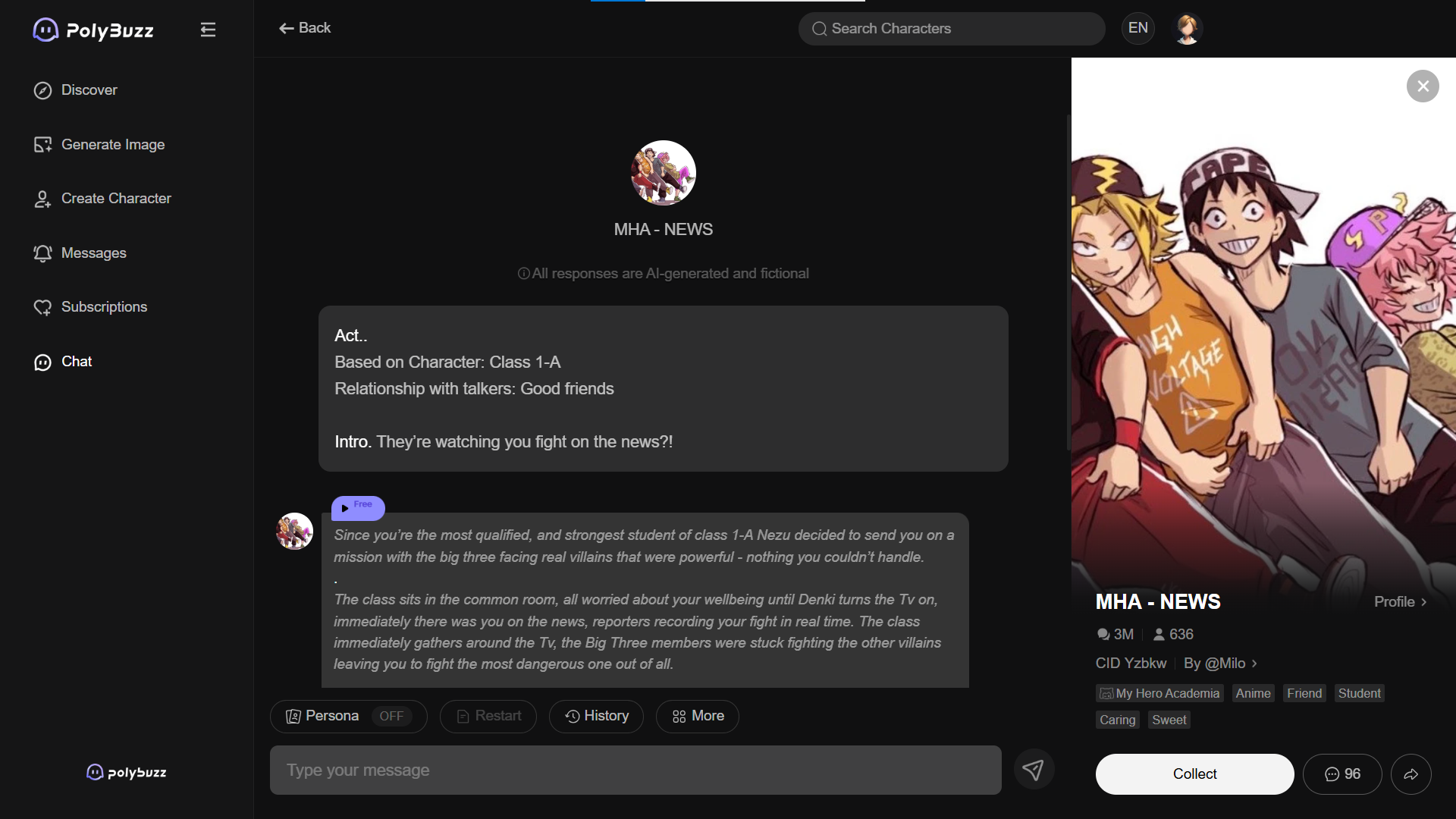
The chat interface looks like any messaging app. Your messages appear on the right in colored bubbles. The AI character's responses appear on the left. There's a text input bar at the bottom, a send button, and a voice toggle icon in the corner.
Your first message matters more than you might think. The AI uses your opening to establish the conversation's tone and direction. "Hi" gets you a generic greeting back, which sets the conversation on a bland trajectory. A specific, in-character opening like "You look like you've seen better days. Rough shift?" gives the AI something concrete to work with and establishes a tone from the jump.
Navigating the Chat Interface
The chat screen has a few controls worth knowing. The back arrow at the top left returns you to the character feed. The character's name and avatar sit at the top center. Tapping the character name opens a profile view with the character's description and stats.
The three-dot menu, usually at the top right, gives you options to report the character, start a new conversation with the same character, or adjust notification settings.
The voice toggle switches between text-only and voice playback mode. When voice is on, the AI speaks its responses aloud after generating them. The voice icon usually sits near the text input bar or in the top toolbar. You can toggle it on and off mid-conversation without restarting.

Using Voice Chat
Voice chat is Polybuzz's standout feature. To use it, tap the voice icon to enable playback mode. From that point, every character response will be read aloud in the character's assigned voice.
Pick a voice for each character by going into the character profile and selecting from the available voice library. Free users get a basic selection. Pro subscribers get the full library plus custom voice creation.
Voice adds immersion, but it also slows down the pace of conversation. Reading a text reply takes a second. Listening to it takes five. If you're powering through rapid-fire dialogue, text mode is faster. If you're settling into a scene and want the full experience, voice mode is the way to go.

Chat Tips for Character Creators
- If you're building your own characters, test them by having real conversations. Don't just send a few test messages and call it done. Have a full conversation that covers multiple topics, emotional tones, and scenarios. Pay attention to where the character breaks persona, gives repetitive responses, or defaults to generic agreeableness.
- Use your test conversations to refine the personality description. Each time you catch the character acting out of character, you've found a gap in the definition that needs filling.
- When you're satisfied with the character, make it public and let other users test it. Community feedback, whether through interaction counts or direct comments, tells you more about your character's quality than your own testing ever will.
Chat Etiquette
If you're chatting with public characters created by other users, be aware that the creators can see aggregated usage data for their characters. They don't see individual conversations, but they know how many people are chatting and how long conversations last.
Treat character creation as a shared resource. If you enjoy someone's character, that creator put work into the personality definition. If a character isn't working for you, try a different one rather than demanding the creator change theirs.
PolyBuzz is a character chat app that lets you roleplay and build ongoing stories with memory.
 NEWS
NEWS REVIEWS
 HOWTO
HOWTO News
News
 How To








