How to Download and Play Call of Duty Mobile on PC
2023-03-30
Call of Duty Mobile is a multiplayer FPS game with various game modes and maps. Read the step-by-step tutorials in this guide to know how to play Call of Duty Mobile on PC.

Call of Duty Mobile is a first-person shooter video game with fast-paced action and immersive gameplay. The game features a range of game modes, including single-player campaigns, multiplayer modes, and cooperative modes. The multiplayer modes offer a range of game types, such as team deathmatch, domination, and capture the flag. Call of Duty also features an extensive range of weapons, equipment, and perks that players can use to customize their loadouts and playstyles.

Call of Duty: Mobile is an online first-person shooter game with multiplayer, battle royale, and extraction matches.
Why do people enjoy playing COD on PC?
People may prefer playing Call of Duty on PC due to the following aspects:
1. Better Graphics and Performance: PC games typically offer superior graphics and performance compared to mobile games, due to the more powerful hardware available on a computer.
2. Larger Screen: PC games can be played on larger screens, providing a more immersive gaming experience and allowing players to see more details and gameplay elements.
3. Customization and Control: Players can customize their gaming experience on PC, including adjusting controls, graphics settings, and installing mods or custom content, which is not possible on mobile.
4. Multiplayer and Social Interaction: PC games often have a larger and more engaged player base, providing more opportunities for multiplayer and social interaction with other players.
5. More Complex and In-Depth Games: PC games tend to offer more complex and in-depth gameplay experiences, with larger maps, more characters, and deeper storylines, which is not possible on mobile due to hardware and screen limitations.
How to Play Call of Duty on PC?
If you want to play COD on PC, you need to install an Android Emulator such as Gameloop, which is easy to set up, launch and run mobile games on the computer. Follow the steps below to learn how to download and play Call of Duty: Mobile on PC with the Gameloop Android emulator.
Step 1: Download Gameloop on your PC
Click here to download the Gameloop Android emulator installer. Once the emulator is installed, launch the Gameloop on your PC.
Step 2: Search and Install Call of Duty on Gameloop
Search for Call of Duty: Mobile on Gameloop, and click the "Install" button next to the game.
Call of Duty: Mobile is an online first-person shooter game with multiplayer, battle royale, and extraction matches.
Step 3: Launch Call of Duty on Gameloop
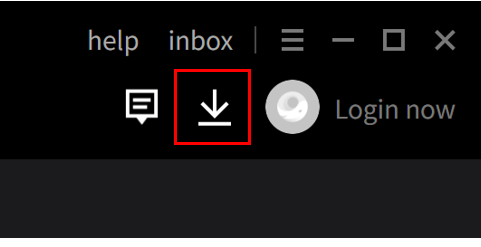
Once COD is installed on Gameloop, click on the download icon in the upper right corner to see the installed list. Find Call of Duty and click on the Open button to launch the game.
Step 4: Play Call of Duty on PC
After granting the required permissions, you can start playing Call of Duty on your PC by Gameloop Android Emulator.
Minimum Requirements
To play Call of Duty on PC with Gameloop, you have to meet the following minimum system requirements:
- OS: Windows 8.1 64-bit or Windows 10 64-bit
- GPU: GTX 660
- CPU: i3-9320
- Memory: 8GB RAM
- Storage: 20MB available space
 NEWS
NEWS REVIEWS
 HOWTO
HOWTO