How to Download Time Cut Pro APK on Android

2026-08-28
Learn how to download the Time Cut Pro APK on Android step by step. Install the Time Cut slow-motion video editor and start making smooth speed edits.

Time Cut Pro is a slow-motion video editor for Android. It takes a normal 30 fps clip and fills in the missing frames with an Optical Flow engine and a deep-learning RIFE model, so your slowed-down videos come out smooth instead of choppy. If you've been searching for the Time Cut Pro APK Download, this guide gets the Time Cut Pro App onto your phone in a few minutes.
The steps are simple, but the order matters. You grab the Time Cut Pro APK, let your phone install it, then open the app. The one real hurdle is the permission warning Android flashes when you install anything from outside its own store. We'll get through it below.
What Is Time Cut Pro?
A quick word before you download, since the full listing name is "Time Cut : Smooth Slow Motion." It's a velocity editor built around one idea: changing the speed of a video without making it stutter.
It works by calculating new frames between the ones your camera already captured. That lets you slow a clip down to 1/10x, speed it up to 10x, or do both in a single speed curve. You can freeze a moment, add motion blur the way desktop tools like RSMB do, and act as a video speed changer and frame rate converter to push a 30 fps clip up to 60, 120, or 240 fps. A built-in AI enhancer cleans up quality before you export.
It's the kind of app people reach for when they edit TikTok and Reels clips, game replays, or any jump and trick shot that looks better in slow motion.
Before You Download Time Cut Pro APK
One setting stops most first-timers. Android blocks installs from outside its own store by default, so you have to flip that switch before the Time Cut Pro APK will install at all.
Open Settings, tap Security or Privacy, and look for "Install unknown apps" or "Unknown sources." Turn it on. On Android 8 and newer, the toggle is per-app, so you might need to allow it for both your browser and the file manager you use to open downloads.
That's the whole setup. No computer, no root, no special tools.
Step 1: Download Time Cut Pro on APKPure
Open APKPure, search "Time Cut" — full title: *Time Cut : Smooth Slow Motion*. Check its update info.
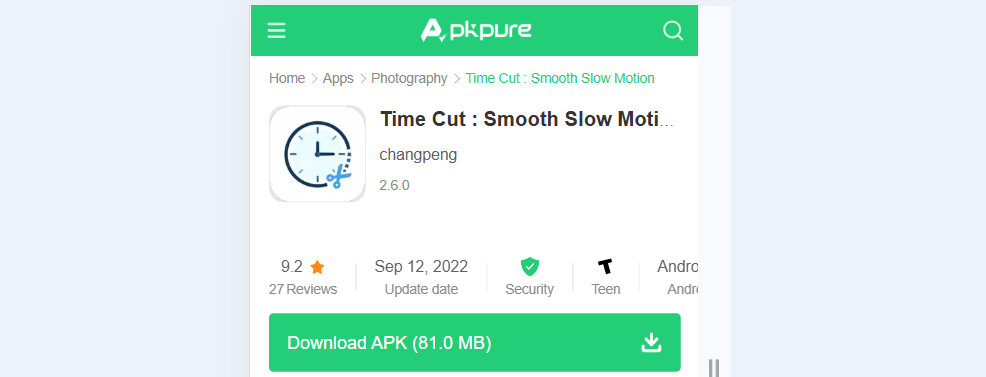
Tap Download. Get APK/XAPK via stable Wi‑Fi. Allow the install prompt after download.
Step 2: Complete installation
Tap the downloaded file. Bypass the unknown‑source warning. Tap Open once done.
Step 3: Start editing
Launch from the app drawer, grant media permission, and import your video clip.
Time Cut Pro Download Troubleshooting
A few install hiccups show up often enough to plan for:
- If the screen says "App not installed," your unknown-sources toggle is probably still off for the app that handled the download. Head back to Settings and check it.
- If you see a "Parse error," the file didn't finish downloading, or it targets a different Android version than your phone. Fair enough. Delete the file and grab a fresh copy over stable Wi-Fi.
- Is the Install button grayed out? An overlay is usually sitting on top of it. Close that window and tap again.
Download Time Cut Pro APK Today
The whole route is short once you know the sequence: allow unknown sources, get the Time Cut Pro APK from APKPure, install, open. No computer needed, no advanced settings to fight.
If you haven't installed it yet, search for Time Cut Pro on APKPure and tap Download. The latest version usually lands there the same day it drops, and you get the file from a source you can trust.

Time Cut : Smooth Slow Motion is a video editing app that changes clip speed and improves motion between frames.
- How to Download Time Cut : Smooth Slow Motion APK Latest Version 2.6.0 for Android 2024
- How to Download HiPhone Launcher OS Phone:Fast APK Latest Version 1.0.9.1 for Android 2026
- How to Download Android System WebView Canary APK Latest Version for Android 2026
 NEWS
NEWS REVIEWS
 HOWTO
HOWTO