


How to Use ChatGPT Image Generator

2026-08-05
A step-by-step guide to creating AI images with prompts, tips for better results, and what you can generate for free.
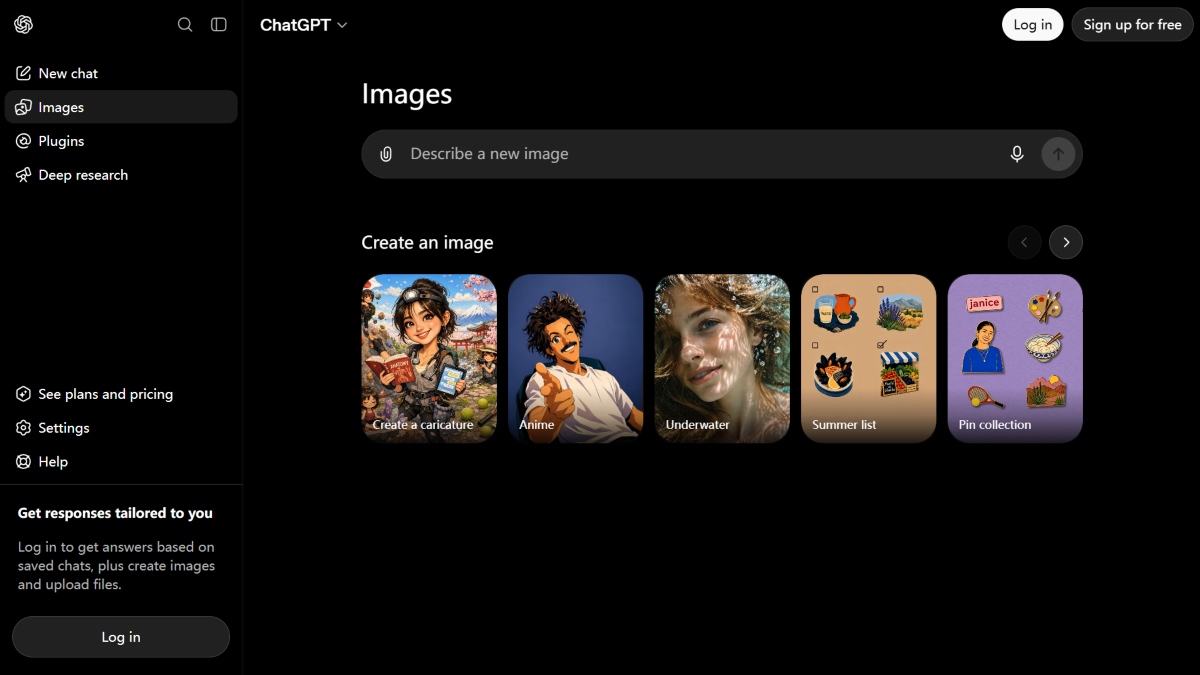
ChatGPT can generate images. Built-in DALL-E integration means you describe what you want and it creates a picture — no separate app needed. The image generator works on the free tier, though Plus and Pro subscribers get more daily generations. Here's how to use it and get results worth keeping.
How to Generate an Image in ChatGPT
Open ChatGPT on web or app. In the chat box, describe the image you want.
- ChatGPT app version: https://apkpure.com/chatgpt/com.openai.chatgpt

- ChatGPT web version: https://chatgpt.com
Start with "Create an image of..." or "Generate a picture of..." ChatGPT automatically routes your request to DALL-E.
You'll see the image appear in the chat within seconds.
Tap or click it to view full size or download.
Each image generation creates one image by default, though you can ask for variations. That's the basic flow. The hard part is writing prompts that produce what you actually want.
Writing Good ChatGPT Image Prompts
The difference between a generic image and one you'd actually use is the prompt. Be specific about four things:
- Subject. What's in the image? "A cat" is vague. "A fluffy orange tabby cat sitting on a windowsill" is specific.
- Style. How should it look? "Photorealistic," "watercolor painting," "pixel art," "1950s comic book style," "3D render." ChatGPT responds to art style descriptions.
- Setting. Where is it? "In a sunlit kitchen," "on a rainy city street at night," "floating in space with nebulas in the background."
- Composition. How is the image arranged? "Close-up portrait," "wide landscape shot," "bird's eye view," "centered with negative space on the sides."
A good prompt: "A fluffy orange tabby cat in a sunlit kitchen, sitting on a wooden windowsill next to a small potted basil plant, photorealistic style, warm morning light streaming through the window."
A bad prompt: "Cat in kitchen."
What You Can Create
ChatGPT images work for social media graphics, blog post illustrations, concept art, mood boards, presentation slides, product mockups, logo concepts, and creative experiments. The output is typically 1024x1024 pixels by default.
For print-quality work, the resolution won't cut it. For digital use, it's fine. You can ask ChatGPT to generate in landscape (1792x1024) or portrait (1024x1792) aspect ratios.
Free vs Paid Image Generation
- The free tier gives you limited daily image generations.
- ChatGPT Plus ($20/month) gets you more and faster.
- ChatGPT Pro ($100-200/month) has the highest limits.
If you're creating images casually, the free tier is enough. If you generate dozens of images daily, you'll want at least Plus.
- How to Download Dunk Shot APK Latest Version 1.4.28 for Android 2026
- How to Download Дія APK Latest Version for Android 2026
- How to Download MahsaNG VPN APK Latest Version 18 for Android 2026
ChatGPT Image Generator Tips
- Iterate, don't restart. If the first image isn't right, tell ChatGPT what to fix. "Make the cat's eyes green instead of yellow" or "Zoom out so we can see the whole kitchen." It remembers context and adjusts.
- Use negative prompts. Tell it what NOT to include. "No text in the image," "no people in the background," "no watermarks."
- Ask for multiple versions. "Generate three variations of that image with different lighting — morning, afternoon, and evening."
- Know the limits. ChatGPT images can't include recognizable real people, explicit content, or copyrighted characters. DALL-E also sometimes struggles with text in images — it may produce garbled letters.
- Save your best prompts. If you nail a style you like, save the prompt. You can reuse the style part ("watercolor painting with ink outlines on textured paper") with different subjects.
 NEWS
NEWS REVIEWS
 HOWTO
HOWTO








