


How to Watch Gamescom 2026 Online: Livestream, Co-Streaming, and Remote Viewing Guide

2026-07-31
Learn how to watch Gamescom 2026 online from anywhere. Stream Opening Night Live and all shows on YouTube, Twitch, and gamescom now, plus co-streaming rules and tips.
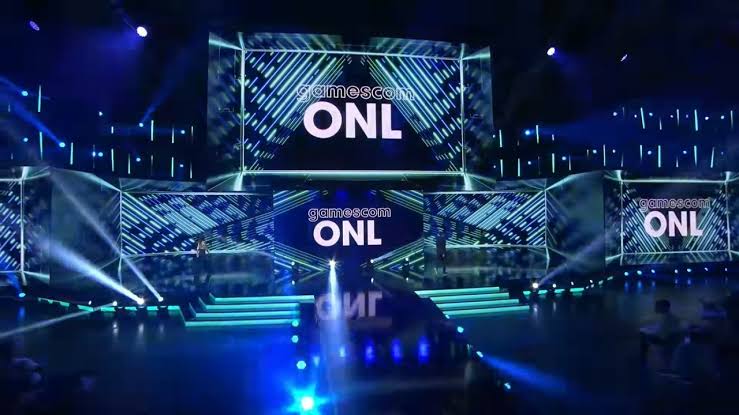
Gamescom 2026 runs August 26 through 30 in Cologne, Germany, with Opening Night Live kicking things off on August 25. If you can't make it to the Koelnmesse in person, you're in luck: every major show streams live online, free, in both German and English. Last year's event pulled 9.8 billion global impressions and over 357,000 on-site visitors from 128 countries. This guide covers every way to watch Gamescom from home, which platform to pick, how to co-stream on your own channel, and what shows to put on your calendar.
If you're putting together a Gamescom watch online checklist, the short version is: pick a platform, check the time zones, and show up on August 25. The long version is below.
Quick Summary: Gamescom 2026 at a Glance
Before diving into each platform, here's the cheat sheet for the entire event.
| What | When | Where to Watch |
|---|---|---|
| Opening Night Live | August 25, evening | gamescom now, YouTube, Twitch |
| Main event (all shows) | August 26 to 30 | gamescom now, YouTube, Twitch |
| gamescom award nominees | August 24 | Press release and gamescom now |
| Event Arena (cosplay, panels) | August 26 to 29 | gamescom now |
| Stream languages | German and English | All platforms |
All streams are free. No registration, no paywall. You can watch Gamescom online free on any of these platforms. Just pick one and tune in.
1. Watch Gamescom 2026 on the gamescom now Platform
gamescom now is the official digital hub for the entire event. It bundles every show, every livestream, and extra content into one place. Think of it as the Gamescom 2026 virtual command center.
Here's how to use it:
1. Go to gamescom.global/gamescom-now during event week (August 25 to 30).
2. Pick the show you want to watch from the schedule.
3. Select your language stream (German or English).
4. The player runs directly in your browser. No app install required.
The advantage of gamescom now over other platforms is that you get everything in one spot, with behind-the-scenes clips, developer interviews, and community features sitting right alongside the live video feed. If you're planning Gamescom 2026 remote viewing as your primary way to experience the event, start here.
One downside: the player can feel less responsive than Twitch or YouTube chat during big announcements. Pair it with a Discord server or Reddit thread for real-time reactions.
2. Stream Gamescom 2026 on YouTube
If you want the best video quality and a familiar interface, the Gamescom YouTube stream is your best bet. The official gamescom YouTube channel broadcasts all shows live in both German and English.
How to watch:
1. Search "gamescom" on YouTube, or go to the official gamescom channel.
2. Look for the live stream during event hours. It shows up as a featured live video.
3. Click "Notify me" on the scheduled stream so you don't miss the start.
4. Adjust quality manually in the player settings. YouTube defaults to auto, which can drop resolution during peak traffic.
YouTube's strength is video quality, and it consistently delivers the highest bitrate among free streaming platforms, which means game trailers and gameplay footage look noticeably sharper on large screens. If you care about seeing every detail in 1080p or better, Gamescom YouTube is the way to go.
Chat moves fast but stays more readable than Twitch during major reveals. You can also rewind the live stream on YouTube, which Twitch doesn't offer for all channels. Missed a trailer? Just scrub back thirty seconds.
3. Watch Gamescom 2026 Live on Twitch
For the community experience, nothing beats the Gamescom Twitch channel. The official gamescom Twitch account streams all the same content as YouTube and gamescom now, but the chat culture is where it shines.
How to watch:
- Go to twitch.tv/gamescom (or search "gamescom" on Twitch).
- Follow the channel to get notifications when streams go live.
- Choose your language stream if multiple are available.
- Engage with chat using Twitch-specific commands and emotes.
Twitch is the natural home for Gamescom co-streaming. When a big reveal drops, the chat reacts in real time with emote spam, hype messages, and instant memes. If you want to feel the energy of 355,000 people in a convention hall through your screen, the Gamescom Twitch stream captures it best.
The trade-off is that video quality can dip below YouTube's during peak load, and Twitch doesn't let you rewind on all channels, so if you miss a moment during a live show, you'll need to wait for the VOD.
4. How to Co-Stream Gamescom 2026 on Your Channel
Gamescom co-streaming is open to everyone, meaning you can rebroadcast any Gamescom 2026 stream on your own Twitch, YouTube, or Kick channel without asking for special permission or going through an approval process. The official guidelines (currently reflecting the 2025 edition, with 2026 rules expected closer to the event) lay out a few ground rules.
What you can do:
- Restream the official Cleanfeed or any platform source (gamescom now, YouTube, Twitch).
- Add your own commentary, reactions, and community interaction.
- Monetize your stream through your platform's normal systems (subs, donations, ads).
What you can't do:
- Violate third-party rights (copyright, trademark).
- Show racist, homophobic, defamatory, or violence-glorifying content.
- Actively integrate ads for nicotine, alcohol, cannabis, pornography, gambling, or online key sales (MMOGA, G2A, and similar). Licensed dealers like Humble Bundle and Green Man Gaming are fine.
- Violate applicable laws, especially criminal law and youth protection.
Setup steps:
1. Open your streaming software (OBS Studio, Streamlabs, or equivalent).
2. Set up a scene that captures the Gamescom 2026 livestream source. You can screen-capture the official stream or use the Cleanfeed URL if available.
3. Make sure your broadcast software is set to record live, not just stream.
4. Add your webcam, overlays, and commentary audio.
5. Start streaming when the show goes live.
Test your setup before Opening Night Live. The biggest reveals of the event happen during ONL, and you don't want to be debugging OBS when a world premiere trailer drops.
5. Gamescom 2026 Show Schedule: What to Watch
You don't need to watch everything. Here's what each show offers and who it's for.
- Opening Night Live (August 25): The big kickoff. Geoff Keighley and Eefje "sjokz" Depoortere host a live stage show packed with new game announcements, world premieres, and update reveals that often set the conversation for the rest of the gaming year. Confirmed appearances so far include Metro 2039 and a new Witcher 3 expansion called Songs of the Past, both targeting 2027 releases. If you only watch one Gamescom show, make it this one.
- gamescom awesome indies show: Produced in partnership with IGN. This segment focuses on indie games getting their moment in the spotlight. If you're tired of AAA blockbusters and want to discover smaller titles with creative ideas, this is your show.
- gamescom GDQ: Games Done Quick makes its European debut at Gamescom 2026. Three days of speedrunning. Players complete games absurdly fast for charity. Expect broken glitches, frame-perfect inputs, and a community that's equal parts technical and generous. It's a different energy from the main stage, and absolutely worth your time.
- gamescom award: 19 categories across Arts, Platform, and Global groups. Nominees are announced August 24. Winners are decided by a combination of expert jury and community vote. If you want to see which games the industry and fans think defined the year, catch the award announcements.
- Event Arena: Four days of open programming on the show floor. The headline events are the Cosplay Contest on August 29 and the DidYouKnowGaming Panel Quiz. Lighter fare between the big announcement shows, and fun to have on in the background.
6. Tips for Gamescom 2026 Remote Viewing
A few practical tips to make your Gamescom online viewing experience better.
- Check time zones. Gamescom runs on Central European Summer Time (CEST). If you're in the US, Opening Night Live typically starts in the afternoon Eastern. Convert the start times before the event so you're not caught off guard.
- Use multiple screens. Watch the official Gamescom 2026 stream on one screen and keep a Reddit thread, Discord, or Twitter feed open on another, because community reactions add context to the reveals and you'll catch details you might miss in real time.
- Prepare your setup the day before. Test your streaming software, check your internet connection, and make sure your platform accounts are logged in. Gamescom week moves fast once it starts.
- Follow exhibitor channels too. Major exhibitors like Xbox, Capcom, and Bandai Namco run their own streams from the show floor, and Xbox alone has confirmed 25 playable games and 140 demo stations at their booth with livestreams on their own YouTube and Twitch channels. These streams often show gameplay that the main gamescom feed doesn't cover.
- Set VOD expectations. Not all shows are archived immediately. If you can't watch live, check the official gamescom YouTube channel for VOD uploads, which usually appear within hours.
Conclusion
Gamescom 2026 is the biggest gaming event of the year, and you don't need a plane ticket to Cologne to experience it. Whether you pick the gamescom now hub for all-in-one coverage, YouTube for video quality, or Twitch for community energy, every Gamescom 2026 livestream is free and bilingual. Gamescom co-streaming is open to anyone who follows the guidelines, and the show schedule runs from world premieres to charity speedruns. Pick your platform, check the time zones, and get ready for a week of game announcements.
If you want to stream Gamescom on your phone, download the YouTube or Twitch app below for the best mobile viewing experience. Both are free, both support live chat, and both will have the official gamescom streams ready to go on August 25.

YouTube is a video streaming app that helps you watch, follow, and create content on Android.
Twitch is a live streaming app that lets you watch, chat, and go live across many topics.
 NEWS
NEWS REVIEWS
 HOWTO
HOWTO









