Package Name:aaa.core.pbs2
SHA-256:7c9ccc69ed4c4d4a3a5ce9caa1a855b2e6dddf11c1d1d064db33d85a42d16b62
Show More
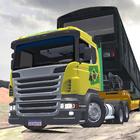

PBS2 is designed for players who enjoy open driving and experimenting with community content. It keeps the familiar sandbox style while expanding beyond buses into other four wheel vehicles. You can explore many community maps and bring in compatible mods from past releases, so your garage can grow quickly. On newer phones, performance stays steady with most add‑ons, and setup is straightforward. If you want a flexible start on mobile, the PBS2 APK fits that need.
Expanded vehicles and community maps
PBS2 welcomes trucks and cars in addition to buses, keeping the focus on free driving across varied locations. Dozens of community maps are available, and the game aims to stay compatible with many mods created over recent years. It also supports selected PC phase 2 bus mods. Devices with 8 or 12 GB of RAM should handle most content smoothly.
Cargo variety and realistic handling
Simple mod setup with scoped access
Access for existing premium users
Lifetime plan owners keep premium features at no extra charge by logging in with a PBSU account. PBSR users can request a switch to this version through email support without additional cost.
This sandbox driver focuses on trucks, cars, and buses, plus community maps and mod support. Review the folder steps to manage mods safely and keep performance stable. For better compatibility and device support, consider installing the PBS2 latest version.
Latest Version
314Uploaded by
Aung Phyo Win
Requires Android
Android 5.1+
Category
Free Simulation GameContent Rating
Everyone
Security Report
Check Now
Report
Flag as inappropriateLast updated on Dec 10, 2025
* Improvements trying to reduce some crashes (3D cache generation will happen in a separate step; ambiance color is off by default).
* Updated Unity Engine security (CVE-2025-59489).
* Updated SDK support for Android 15 and 16.
* New 3D Cache to speed up loading times.
* If the game crashes for you, try this: at Extras Settings, disable Use 3D Cache. On some devices the setting that causes crashes is Ambiance color based on sky, at Graphics Settings. Try that on/off to see if it works for you.



APKPure - A multi-platform app store primarily focused on Android, providing extensive app-related content. Discover the app you want easier, faster, and safer, with quick and efficient downloads and installations.