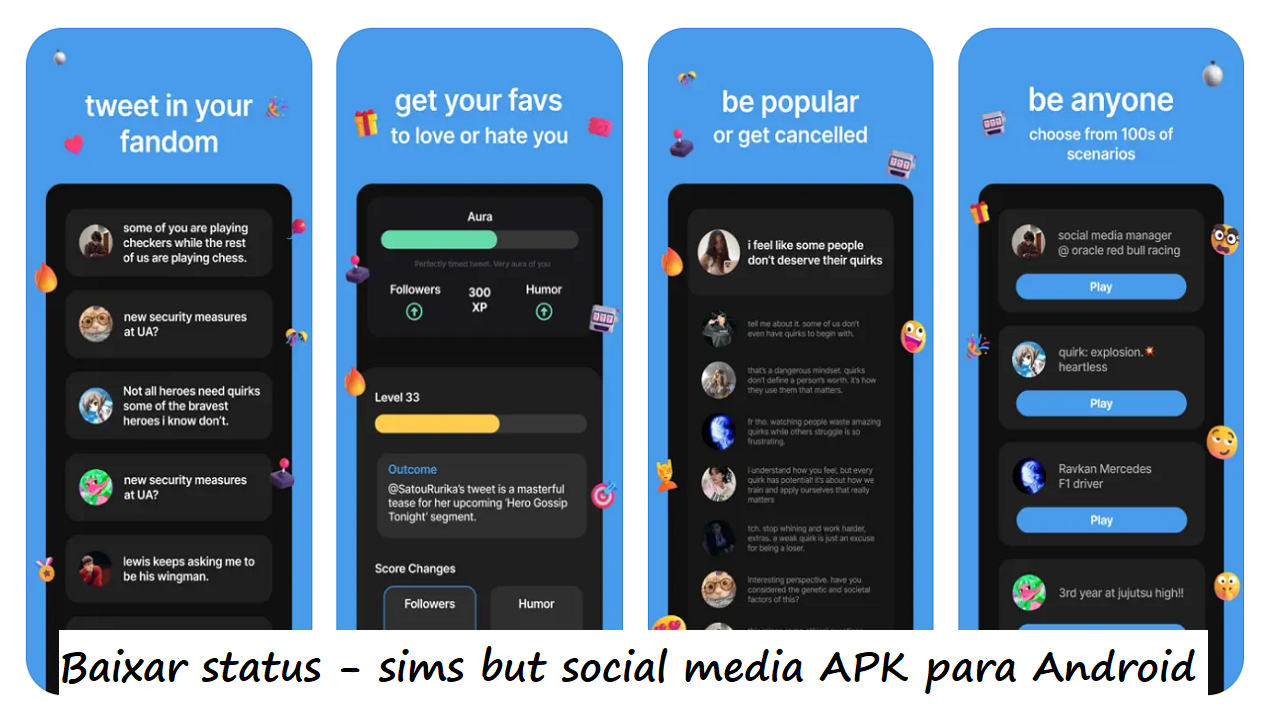
status - sims but social media is for users who enjoy fanfiction-style stories but want to shape them through a simulated social feed. Instead of using a standard social network, you create a virtual public life and see how other accounts react to it. Your choices can change the direction of your story over time. Users who want to download status - sims but social media can expect a roleplay experience built around personas, fandom conversations, and character-based interactions.
Create a public persona
status - sims but social media lets you build an avatar, profile, and public identity for your roleplay. You can decide whether your character is a new creator, a well known celebrity, or someone involved in online drama. This persona sets the context for the posts, conversations, and story choices that follow.
Browse fandom communities
You can explore feeds inspired by fandoms such as anime, Marvel, Harry Potter, and K-pop. These communities provide topics, trends, and accounts to interact with during fandom roleplay. As a result, you can choose a setting that fits the type of story or character you want to play.
Talk with AI characters
status - sims but social media includes AI characters that can follow your account, reply to public posts, and send messages. You can write posts for the feed, respond in comment threads, or continue a conversation through private DMs. The character style personalities are designed to respond while staying within their assigned role.
Build or damage your reputation
Your wording, timing, and responses can affect followers, attention, and the reactions around your account. A post may gain attention through a trend, while another choice may create controversy or lead to cancellation within the simulation. This makes the social media simulator feel more like an ongoing story than a feed with fixed outcomes.
Use events and energy carefully
You can join event prompts, duels, mentions, and trending topics to earn XP and open more interactions. However, posts, replies, and DMs use coffee energy, so longer sessions require some planning. Energy restores over time, and optional purchases are available for users who want to continue interacting for longer.
Status AI offers roleplay settings that can include both SFW and NSFW interaction options. Users can choose their interaction preferences before focusing on a particular story style. This is useful for deciding whether the available conversation style matches the type of AI characters and roleplay content you want to see.
The app does not present every interaction as separate from the rest of the feed. Replies, DMs, follower changes, trends, and public reactions can influence later situations in your virtual online life. If you are looking for the status - sims but social media APK, keep in mind that the main experience centers on writing and reacting to roleplay scenarios rather than viewing content from real people.
Start by choosing the kind of online identity and community you want to roleplay in. The status - sims but social media latest version lets you move between your profile, fandom feeds, and conversations as your story develops. Keep an eye on coffee energy when planning several posts or messages.
Open the app and create an avatar, profile name, and public persona that fit the role you want to play.
Choose a fandom or browse available communities, then read the feed to find topics and character accounts that interest you.
Make a public post or reply to existing conversations so other accounts can react to your persona.
Use private DMs when you want to continue a character-focused conversation away from the public feed.
Check trends, events, duels, XP, followers, and coffee energy before deciding what to do next in the story.
status - sims but social media combines a persona creator, AI character chat, and consequence-based social feed roleplay. It may suit users who want to write posts, join fandom conversations, and see how their virtual reputation changes through each interaction. Download status - sims but social media APK from APKPure today to get started with your virtual profile.
Official information is available from the developer:
Website: https://www.statusai.com/
Latest Version
1.9.61Uploaded by
Thae Oo Hlaing
Requires Android
Android 7.0+
Category
Free Lifestyle AppContent Rating
Teen · Language
Report
Flag as inappropriateLast updated on Sep 14, 2026
- mute public stories
- activity log redesign
- other bug fixes



APKPure - A multi-platform app store primarily focused on Android, providing extensive app-related content. Discover the app you want easier, faster, and safer, with quick and efficient downloads and installations.