Scan Date:Jul 29, 2026
Show More


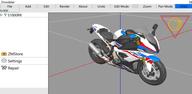
ZModeler for Android focuses on GTA San Andreas modding and light 3D asset work. It evolved from SA File Editor, and it brings familiar desktop tools into a touch workspace so you can import, adjust, preview, and export models without a PC. The interface is dense because it consolidates modeling, materials, and animation checks in one place. Therefore, it suits creators who want a portable DFF editor with a clear path to validate skins, vehicles, and objects, and then hand off assets to game mods or other tools when needed.
GTA focused DFF editing
ZModeler for Android is built around the DFF asset types used in GTA San Andreas. You can open vehicles, skins, and world objects, then make targeted edits that match mod workflows. Moreover, the app keeps naming and hierarchy visible so assets stay game ready.
Wide format import and export
You can import DFF, OBJ, and 3DS to bring in meshes from different sources. ZModeler for Android also exports to DFF and OBJ, which helps you pass models to other tools or back into the game. In addition, this pipeline makes quick fixes on mobile practical.
Material controls inside the editor
Adjust colors, textures, reflections, and lighting parameters for DFF materials without leaving the app. These controls let you refine visual output during review. Therefore, you can see results immediately before you export.
Animation preview with IFP
Load compatible skin and IFP files to play animations and verify weighting or timing. This helps you confirm pose behavior and basic motion on mobile. Also, it reduces round trips to a desktop just to validate animation sets.
Geometry editing and splitting
Translate and rotate meshes to correct placement or orientation, then split geometry into fragments for tighter control. You can isolate parts to edit them independently. As a result, complex assets remain manageable on a small screen.
Scene organization with clear naming
Rename geometry and frame nodes to keep large scenes readable. Consistent naming supports better exports and easier debugging in mods. In addition, it helps teams track parts across different tools and handoffs.
This quick guide explains the basic workflow from import to export. It uses GTA San Andreas assets as an example, and the steps also apply to general OBJ work.
Install the ZModeler for Android APK from APKPure, then open the app and grant file permissions so it can access your models.
Tap Import and choose a DFF, OBJ, or 3DS file. Confirm the path and wait for the scene to load in the viewport.
After the model appears, select parts to translate or rotate as needed. Rename geometry and frame nodes to keep the scene tidy.
Open the material panel to adjust color, texture maps, reflection, and lighting parameters. Load a compatible skin and IFP if you need to preview an animation.
Then review the result and export to DFF or OBJ. Test the output in your mod or pass the file to other tools for further steps.
ZModeler for Android makes DFF editing, material adjustments, and animation checks possible on a phone. Get the ZModeler for Android APK latest version on APKPure to keep your GTA San Andreas models moving through the pipeline. If you prefer a previous build for compatibility, download ZModeler for Android from the versions list and roll back safely.
How do I download and install ZModeler for Android on APKPure?
To download ZModeler for Android, open the app page on APKPure and tap the Download APK button, then install following the on screen instructions for your device.
What changed when SA File Editor became ZModeler for Android?
SA File Editor was renamed to ZModeler for Android, and the app continues to focus on DFF editing and mobile 3D tweaks. The rename aligns the tool with its modeling features while keeping existing workflows familiar.
Does ZModeler for Android support DFF and IFP for GTA San Andreas?
Yes, ZModeler for Android opens DFF assets for vehicles, skins, and objects, and it can preview animations when you load a compatible skin with IFP files. This helps validate meshes and motion before export.
Can I export models for other tools with ZModeler for Android?
Yes, the app exports to DFF and OBJ. This allows you to use the output in other editors or move assets back into GTA San Andreas mods after checks.
How can I roll back to an older version like 2.5 beta on APKPure?
Open the ZModeler for Android page on APKPure and go to the Versions section. Select the older build you need, download it, and install after backing up your current work.
Latest Version
2.9.4Uploaded by
Satt Naung
Requires Android
Android 9.0+
Category
Free Tools AppContent Rating
Everyone 10+ · Violent References
Security Report
Report
Flag as inappropriateLast updated on Jul 29, 2026
Actualizado el android target



APKPure - A multi-platform app store primarily focused on Android, providing extensive app-related content. Discover the app you want easier, faster, and safer, with quick and efficient downloads and installations.