Grok Voice Mode: How xAI's Conversational AI Works with Voice Chat

Dorothy MorganContent Editor
2026-08-06
How xAI's Grok voice chat works, what it can do, how to use the voice assistant, and how it compares to ChatGPT voice.
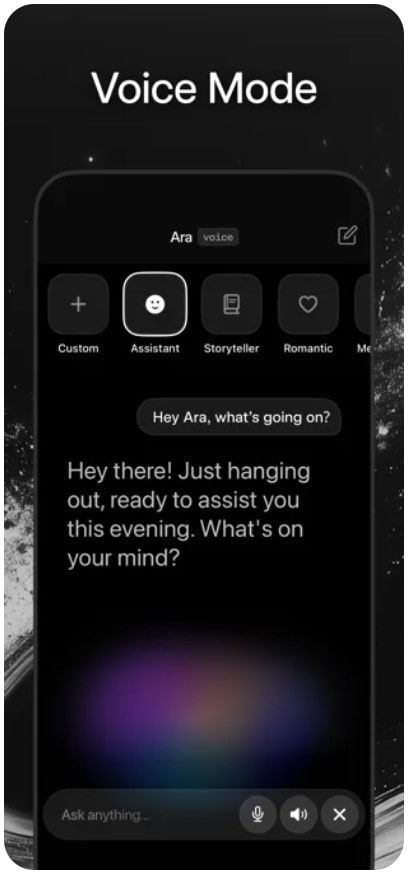
Grok voice mode lets you talk to xAI's chatbot out loud. You speak, Grok listens, and responds in a natural-sounding voice. It's available on the Grok mobile apps for iOS and Android, and works similarly to ChatGPT's voice mode — tap the microphone, start talking, get a spoken response.

How to Use Grok Voice Mode
- Open the Grok app on your phone.
- Tap the microphone icon near the chat input.
- Start speaking.
- Grok transcribes what you say, processes it with the Grok model, and speaks its response back through your phone's speaker.
- Ask follow-up questions without tapping anything. It feels like a phone call, not a series of discrete Q&A exchanges.
Note:
1. Voice mode works on both the standalone Grok app and within X's mobile app where Grok is available.
2. You can interrupt Grok mid-response (unlike early versions that required turn-taking), and it adapts.
What Grok Voice Does Well
- Hands-free interaction. Driving, cooking, working out — any situation where typing is impractical. Grok voice mode handles these scenarios smoothly.
- Conversational brainstorming. Talking through ideas out loud often feels more productive than typing them. Grok's casual personality works well in voice — it feels less like commanding a computer and more like talking to a sharp friend.
- Real-time questions. "What's the score of the game?" "What's the latest on [news story]?" Grok's X integration means current information is immediately accessible in voice conversations.
- Language practice. You can practice speaking a foreign language with Grok. It understands multiple languages and can converse in them, providing a low-pressure practice partner.
Grok Voice vs ChatGPT Voice
- ChatGPT's voice mode has more natural-sounding voices with better emotional range. OpenAI invested heavily in voice quality, and it shows. ChatGPT's voices sound more human and expressive.
- Grok's voice mode is more conversational in content, even if the voice quality is slightly less polished. Because Grok itself has more personality, voice conversations with Grok often feel more engaging. The AI's willingness to express opinions and be casual translates well to spoken interaction.
For pure voice quality: ChatGPT. For conversational personality: Grok.
Voice Mode Limitations
- Voice mode requires an internet connection — there's no offline processing. It uses your data plan if you're on cellular. Background noise can affect transcription accuracy, though modern noise filtering handles most everyday environments.
- Voice mode is currently mobile-only. The web and desktop versions of Grok don't support voice conversations. This is similar to ChatGPT's approach.
- Voice history is saved as text transcripts in your chat history. You can review, delete, or continue voice conversations as text later.
- Grok Adds AI Companions Ani and Ruby
- How to Download WallFancy - 4K Live Wallpaper APK Latest Version 1.9.1 for Android 2026
- How to Download Google Pay: Save and Pay APK Latest Version for Android 2026
Back to top
 NEWS
NEWS REVIEWS
 HOWTO
HOWTO