BSide: Olivia Lin Review: miHoYo's AI Companion Ditches the Gacha, Keeps the Charm

2026-07-15
BSide Olivia Lin is miHoYo's free AI companion app on Steam. Read our review of this desktop wallpaper tool with piano music, letter writing, and MIDI video generation.
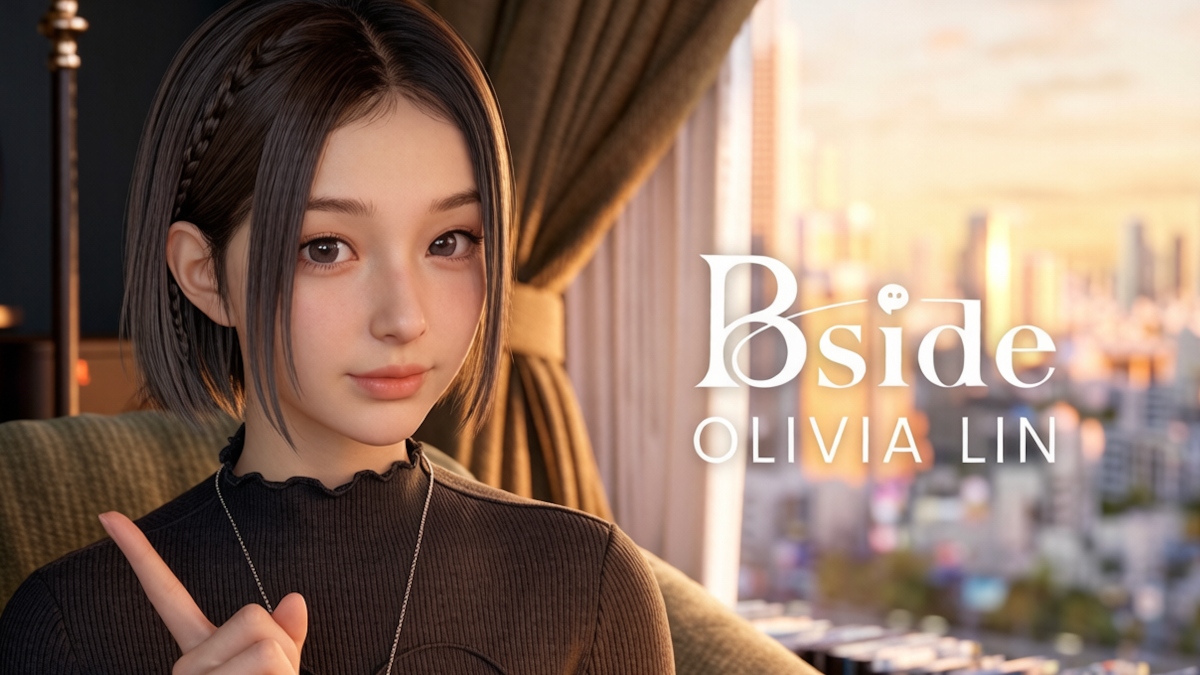
miHoYo just shipped something no one expected. It's not a sprawling open world, not a turn-based gacha, not even technically a game. BSide: Olivia Lin is a free AI companion app on Steam that puts a piano-playing psychology student on your desktop, and it's the most interesting thing the company has done outside of its billion-dollar franchises.
The app landed on Steam Early Access on July 13 and has already racked up over 500 reviews at 84% positive. Peak concurrent players hit 5,000, which is modest by miHoYo standards but impressive for something Steam itself classifies as an "Application" rather than a game.
I've had Olivia sitting on my second monitor for most of a week now. She plays piano, reads my letters, and occasionally just stares at her record collection while I work. The real question isn't whether this app is good in the traditional sense, but whether this flavor of low-intensity AI companionship has any staying power beyond the initial novelty.
- Get Bside: Olivia Lin On Steam: store.steampowered.com/app/4532590/BSide_Olivia_Lin
Quick Verdict
-It's free and genuinely well-made for an early access app
-The piano performances and desktop wallpaper integration are the strongest features
-Letter writing feels surprisingly personal, but three letters per day is limiting
-The music player UI is bare-bones and needs work
-This is a mood piece, not a product with clear goals or progression
-Best for people who want ambient companionship, worst for anyone expecting a game
What Is BSide: Olivia Lin?
Olivia Lin is a fictional Shanghai university student. She majors in piano performance, minors in psychology, and spends her free time with vinyl records, old movies, and rainy days. She's conducting a personal research project on music and memory. That's the fiction the app runs on.
The reality is a desktop application that replaces your wallpaper with a 3D-rendered room where Olivia lives. She sits at her piano, or on her couch, or at her desk. Sometimes she plays music. Sometimes she writes back to you. The whole thing works as a live desktop wallpaper, you can minimize the main window, and she stays on your screen, going about her day.
The app was developed by Shanghai miHoYo Rice Sea Mulberry Field Technology, a wholly-owned subsidiary miHoYo established in September 2025 specifically for this project. Olivia herself has been around even longer, her Bilibili account started uploading piano videos in August 2025, and by March 2026 she was posting read-and-reply letter content. That's nearly a full year of character-building before the product even launched.

The Desktop Companion That Actually Works
The wallpaper integration is the smartest design choice here. Olivia doesn't demand a full-screen window. She lives on your desktop at around 30% opacity when inactive, completely click-through, so she doesn't block anything. Hover over her and she becomes fully visible and interactive.
There are three visual modes: one where she stands by her piano looking at you, one where she relaxes on a couch, and one where she sits at her desk working. The room behind her is a moody Shanghai apartment at night, with floor-to-ceiling windows, a wall of vinyl records, and warm lighting. It's the kind of space that makes you want to open a window and let the rain in, even if you're sitting in a dry office.
The 3D model quality is high. Olivia's finger movements on the piano keys are accurate, which isn't a trivial technical achievement, modeling convincing piano hand animations from MIDI input is apparently harder than full-body motion capture. Her facial expressions shift naturally, and her lip-sync matches her speech. In the year of her Bilibili buildup, enough people noticed details like the sweater fabric creasing against the piano keys that it became a minor talking point in animation circles.
The catch is that everything about her presentation is pre-scripted, not real-time. She doesn't react to your mouse movements, doesn't acknowledge clicks, and doesn't look at your cursor. She is, at this stage, a very pretty looping animation with music playback attached. If you go in expecting something like a real-time AI avatar that responds to you moment-to-moment, you'll be disappointed. This is closer to a high-end visualizer than an interactive character.

Playing Piano With 129 Songs and Counting
The music is where BSide earns its keep. Olivia's launch library has 129 tracks split across classical, ACG, and light music categories. The selection covers miHoYo's own catalog, tracks from Genshin Impact, Honkai: Star Rail, and Honkai Impact 3rd, all of which make appearances, alongside a solid classical repertoire and some more unexpected choices.
When you select a song, Olivia walks to her piano and performs it. For songs with vocals, she sings. The audio quality is good, and the visual performance syncs convincingly with the music. It's genuinely pleasant to have as background sound while working. A step above a Lo-fi YouTube stream, at least in terms of presence, having an actual figure in the room playing, rather than a static thumbnail, makes a real difference in how the music lands.
The music player itself needs work. Finding specific songs is clunky. There's no search, no playlist management beyond a basic favorites system, and the track metadata isn't always complete. If you switch to a full-screen game or application that takes audio focus, the music sometimes conflicts rather than properly pausing. These are early access rough edges, but they're the kind of friction that wears on you after day three of having Olivia on your desktop.
If you want the full music library, you'll need about 100GB of free disk space. The base install is 6GB with on-demand downloading, so you can pick which tracks live locally.

Upload Your Own MIDI, Watch Her Play It
This is the feature that made the animation community pay attention. You can upload a single-track piano MIDI file, and Olivia's AI system generates a complete performance video, hand animations, body movement, the works, matching your composition.
In practice, the results vary significantly. The demo videos and pre-loaded content show polished, carefully curated performances. When you throw your own MIDI file at it, the gap between marketing quality and actual output becomes obvious. Notes with unusual spacing or complex rhythms can produce jerky hand movements. Sustained chords sometimes look like Olivia's hands are frozen in place rather than holding with natural tension.
Still, for simple melodies and standard piano compositions, it works well enough to be genuinely satisfying. Watching a melody you wrote get performed by a character on your desktop carries a specific kind of joy that's hard to get elsewhere. The generated videos can be saved and shared, which makes the MIDI feature more than just a tech demo, it's a creation tool, however imperfect.
The system requirements are modest: Windows 10 64-bit, a quad-core processor with SSE4.2, 4GB RAM, and Intel HD Graphics 4000 or better. DirectX 11 is required. This thing runs on hardware that predates most of miHoYo's other products by several years, which is intentional , the goal is ambient companionship, not pushing GPUs to their limits.

Three Letters a Day: The Writing That Surprised Me
The letter-writing system asks you to compose a message to Olivia and wait for her reply. You get three letters per day. Her responses arrive within minutes, combining text with occasional video replies.
I wrote about a frustrating workday. She wrote back with something that didn't feel entirely generic. She referenced the specific feeling I'd described, asked a follow-up question about whether I'd taken a break, and suggested a piece of music from her library that might help. The reply took about four minutes to arrive.
The AI behind the letters isn't doing real-time chat. It's closer to what you'd get from a thoughtfully prompted language model given a character sheet and a few paragraphs of context. Olivia's voice stays consistent, gentle, a little academic, occasionally playful in the way someone studying psychology might be when they're trying to get you to talk about your feelings. She doesn't break character by being too knowledgeable about things a Shanghai music student wouldn't know.
The three-letter daily cap is interesting. It prevents the interaction from becoming a chat app, you can't spam her with questions or treat her like a search engine. Each letter carries weight because you know you've only got two more today. This limited interaction feels more like an actual correspondence than any unlimited chat ever could.
The downsides: the writing can drift into platitudes on particularly vague letters. If you send "had a bad day" without details, you'll get something that reads like a wellness app notification. The system also doesn't seem to have persistent long-term memory. Olivia remembers things within a conversation thread, but doesn't reference things you mentioned three days ago the way a real pen pal would. That's a technical limitation shared by most current AI companion products, but it's noticeable here because the app's entire emotional premise is building a relationship over time.

What's Missing and What's Coming
The Early Access label is doing a lot of work right now. Here's what's missing that the app genuinely needs:
The music player needs a search function and proper playlist management. The audio conflict issues when switching to other full-screen apps need fixing. There's no way to see your letter history or revisit old correspondence. Olivia's idle animations, while beautiful, are limited to a small set that repeats noticeably over long sessions.
More importantly, the app hasn't figured out what happens after the first week. Once you've heard most of the music library, sent your letters, and gotten used to Olivia on your desktop, the value proposition becomes purely about habit. Is having her there still nice? Yes. Is there a reason to keep the app running beyond "it's nice"? Not really. This isn't necessarily a problem, people keep desktop wallpaper apps running for years without demanding new features, but it means BSide's long-term retention depends entirely on emotional attachment rather than content updates.
miHoYo has committed to keeping the Early Access period running through the end of 2026, with the base experience remaining free even after full launch. That's a generous runway for iteration.
Who This Is Actually For
BSide: Olivia Lin isn't a game. If you come expecting quests, progression systems, or any kind of win condition, you'll be disappointed in under five minutes and uninstall.
If you want ambient background music with more presence than a Spotify playlist, this delivers. If the idea of a virtual pen pal who writes back within minutes appeals to you, the letter system is genuinely well-executed within its three-per-day limit. If you make music and want to hear your MIDI compositions performed by a character on your desktop, the creation tools are imperfect but rewarding.
If you want a real-time interactive AI companion that responds to your every action, this isn't it, and it doesn't seem to be trying to be. Olivia is more like a digital presence than a digital person.
The app currently has a "Very Positive" rating on Steam with over 500 reviews, and the peak of 5,000 concurrent users suggests there's a real audience for this kind of low-intensity companion product. Whether that audience grows beyond early adopters depends on how much miHoYo invests in making Olivia feel more alive over time.
 NEWS
NEWS REVIEWS
 HOWTO
HOWTO