What Is GameNative? How to Play PC Games on Android Phones

2026-08-28
GameNative lets you play PC games on Android using Proton and FEX translation layers. Here's how it works.

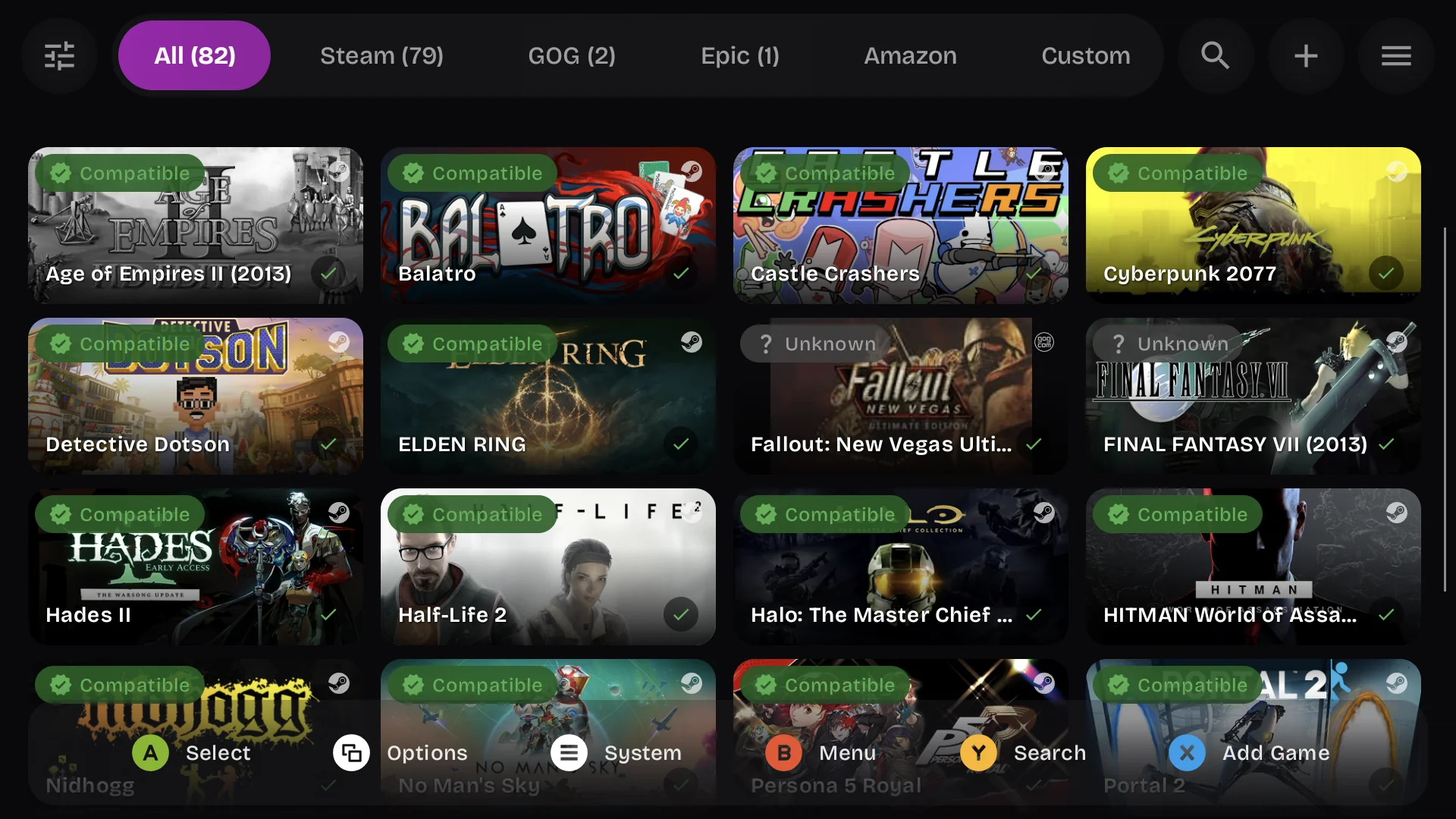
GameNative is a free, open-source Android app that lets you install and play PC games directly on your phone or tablet. Built on the Pluvia project, it supports Steam, Epic Games Store, GOG, and standalone game files. If you've ever wanted to play your PC library on the go without cloud streaming, GameNative is the closest thing to making that work.
How GameNative Runs PC Games on Android
Most Android devices use ARM-based chips, while PC games are built for x86 architecture. GameNative bridges this gap using translation layers. It bundles Valve's Proton compatibility layer and FEX, which converts x86 instructions into ARM instructions. These are the same tools that Valve uses for SteamOS on Linux.
The result is that Windows games can run on Android hardware. The performance depends heavily on your device's processor. Older or mid-range chips will struggle with demanding titles, but newer flagship processors handle indie games and older AAA titles reasonably well.
Known Configs: GameNative's Best Feature
The standout feature of GameNative is "known configs." When you launch a game, the app automatically selects the best configuration for that specific title on your specific device and GPU. This saves you from the trial-and-error of manual tweaking.
The system is powered by voluntary user feedback and technical signals. After exiting a game, you can rate your experience and report issues. GameNative then uses an algorithm that weighs factors like recency, session length, and user ratings to recommend settings that actually work for your hardware. This community-driven approach has led to faster development and better compatibility over time.
Snapdragon 8 Elite and Turnip Driver Support
GameNative performs best on devices with Snapdragon 8 Elite or 8 Elite Gen 5 processors. These chips deliver significant CPU and graphical improvements over previous generations. The missing piece for a long time was open-source Turnip GPU drivers, which bring optimizations and bug fixes critical for translation-based gaming. The first Turnip drivers for Snapdragon 8 Elite chips were released in early 2026.
GameNative creator Utkarsh Dalal reports being able to play Hitman World of Assassination and Cyberpunk 2077 on these chips, though the latter still has occasional freezes. He recommends buying devices with 8 Elite chips for PC gaming on Android, with the caveat that drivers are maturing quickly but aren't fully polished yet.
Steam ARM Integration Coming to GameNative
Valve released a native Steam client for ARM-based Linux platforms, and GameNative is already testing a version that integrates the Steam ARM Linux client. This integration could ship in GameNative v1.0 if everything goes to plan. It would bring online play and other Steam integrations directly to Android devices with almost no overhead.
Valve's work on Proton, FEX, and the ARM Steam client benefits the entire Android PC gaming community. As these components mature, more games will work out of the box with better performance and reduced heat.
Beyond Snapdragon: Pixel 10 and Other Chips
GameNative surprised the community by bringing initial support for the Pixel 10 family earlier in 2026. These phones use an Imagination PowerVR GPU, a brand typically neglected by emulator developers. Even ARM Mali graphics get more attention than PowerVR.
The open-source nature of GameNative means contributors can add support for different GPU families over time. This is particularly refreshing compared to rival apps like GameHub, which have faced criticism for trackers and extensive permissions. GameNative has no ads, no user data monetization, and no paywalls.
GameNative vs Handheld PCs
The big question is whether an Android device running GameNative can truly replace a dedicated handheld PC like the Steam Deck or ASUS ROG Ally. Dalal's long-term goal, laid out in the public roadmap, is to make that happen within two years.
Handheld PCs currently hold the advantage in both performance and compatibility because they use x86 chips that run PC games natively. But devices like the $400 Odin 3 show what Android handhelds could become: powerful, cheap, and portable. Combined with GameNative's improving compatibility, the gap could close.
The app is available on the Google Play Store now, having previously been GitHub-only. If you want to try it, search for GameNative on the Play Store. For the best experience, use a device with a Snapdragon 8 Elite chip and keep your expectations calibrated: indie titles and older games work well, brand-new AAA releases are hit or miss.
- How to Download Jaumo Dating App: Flirt & Date APK Latest Version 202610.1.2 for Android 2026
- How to Download Drift for Life APK Latest Version 1.6.3 for Android 2026
- How to Download Galaxiga: Galaxy Arcade Game APK Latest Version 25.95 for Android 2026
Conclusion
GameNative represents the most serious attempt to bring PC gaming to Android without cloud streaming. The known configs feature removes the biggest barrier: manual configuration. With Steam ARM integration on the horizon and Turnip drivers maturing, the app is on a path that could genuinely challenge dedicated handheld PCs within two years. If you have a capable Android device and a Steam library, GameNative is worth trying.
 NEWS
NEWS REVIEWS
 HOWTO
HOWTO