


What Is GPT-Live1? OpenAI's Full-Duplex Voice Model Explained

2026-09-15
GPT-Live1 is OpenAI's full-duplex voice model now available as an API. It listens and speaks simultaneously, handles interruptions, and delegates complex reasoning to backend models.

If you've ever talked to a voice assistant and felt like you were using a walkie-talkie instead of having a conversation, GPT-Live1 is the fix. It's OpenAI's full-duplex voice model, meaning it can listen and speak at the same time. No more waiting for the AI to finish before you can jump in. No more awkward pauses when you stop to think, and the assistant assumes you're done talking.
OpenAI launched GPT-Live1 for ChatGPT users in July 2026 and opened it up to developers as an API on September 10. At $0.05 per minute for the front-end voice layer, it's aimed at developers building real-time voice AI applications. The ChatGPT app brings this technology to your phone, and you can try it right now.
What GPT-Live1 Actually Does
GPT-Live1 is a speech-to-speech model. That sounds simple, but it's a big deal. Previous voice assistants chained three separate models together: speech-to-text, a language model for reasoning, and text-to-speech. Each handoff added latency and created opportunities for information loss.
GPT-Live1 collapses that chain. It handles speech understanding and speech generation in a single model, which cuts the delay between you speaking and the AI responding. When OpenAI tested it against the previous GPT-Realtime-2.1 on the Full Duplex Bench, GPT-Live1 scored 80.1 percent. The older model managed 45.4 percent. That's a 30-point gap.
The model also supports native ASR transcription and response text. Developers get the audio and the text version without bolting on a separate speech recognition service.
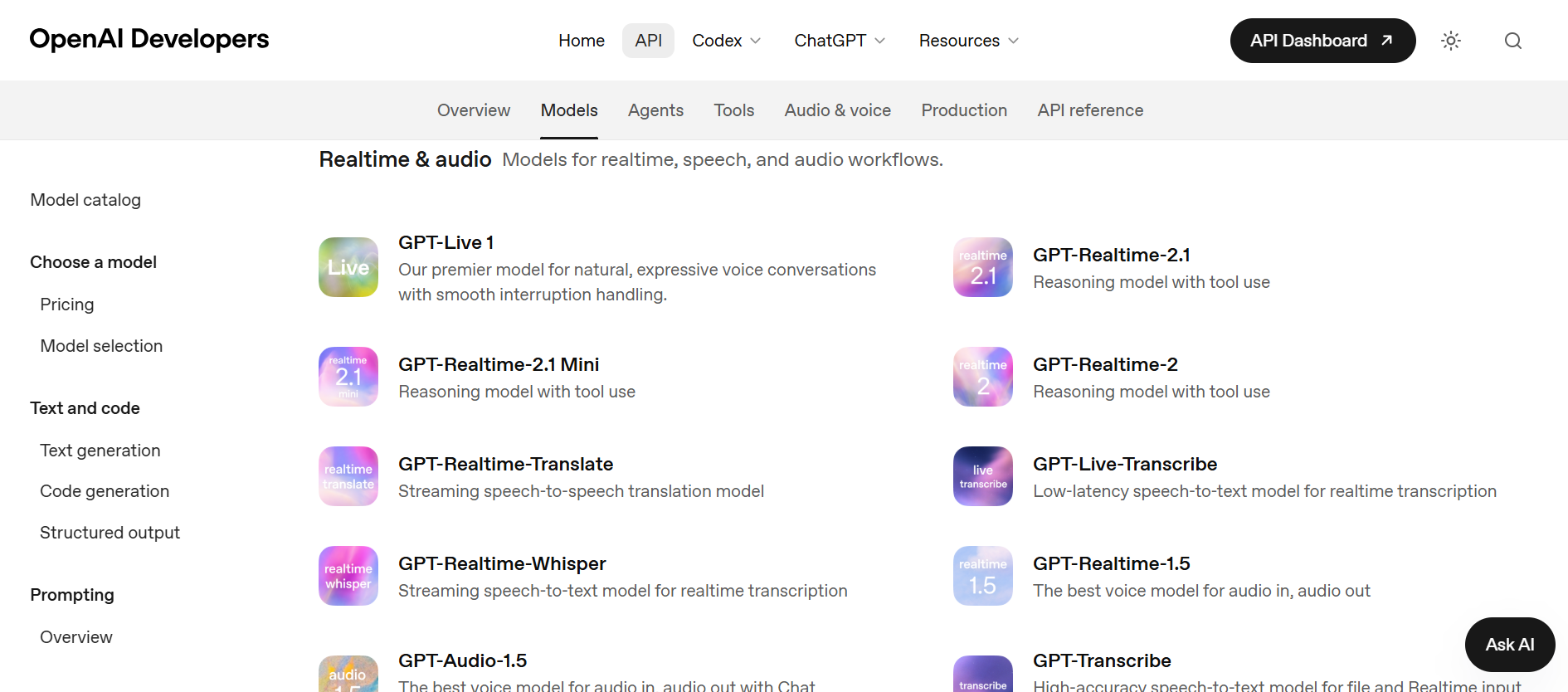
Image Credit: Open AI
How Full-Duplex Voice AI Works
Full-duplex is a telecom term. It means data flows in both directions at the same time. Applied to voice AI, the model processes your incoming audio while simultaneously generating its own speech output. It doesn't wait for silence to decide you're done talking.
Instead, GPT-Live1 makes decisions multiple times per second: should it speak, keep listening, pause, interrupt, or call a tool? You can interrupt mid-sentence, and the model adjusts. If you pause to think, it waits. It'll even toss in a short "mhm" or "right" to signal it's still listening, the way humans do in real conversation.
This is a shift from turn-based systems like ChatGPT's old Advanced Voice Mode, which relied on silence detection to figure out when you finished speaking. A passing siren or a one-second pause could trick it into responding too early.
Backend Delegation to GPT-6 Astra and Other Models
GPT-Live1 handles the conversation layer. It doesn't try to do everything. When a question needs deep reasoning, web search, or tool calls, the model delegates that work to a backend text model. At launch, the default backend was GPT-5.5. Developers can now configure which backend model to use, including GPT-6 Astra.
This split matters because it separates voice interaction from reasoning depth. You get natural, low-latency conversation up front and whatever computational muscle you need in the back. Developers pick the reasoning level that fits their use case and budget.
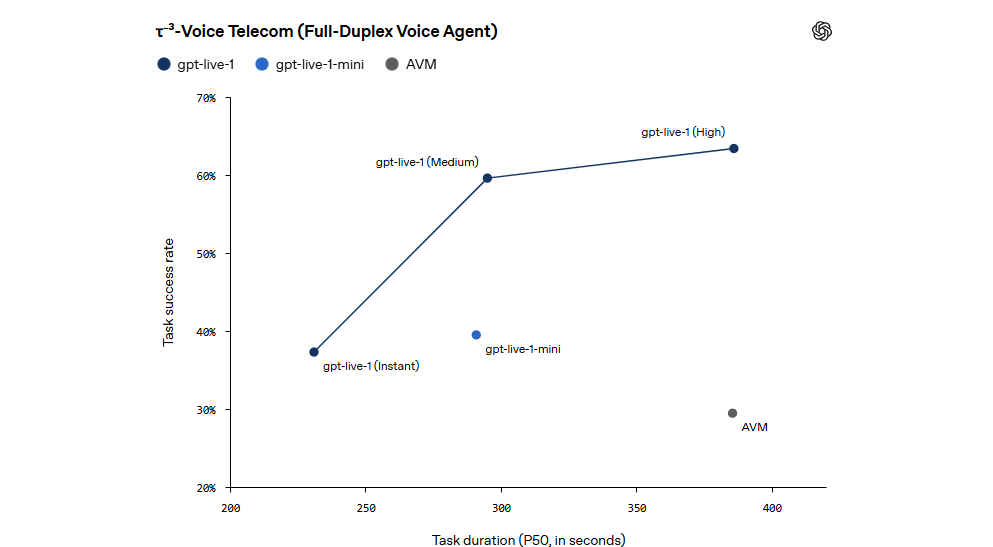
OpenAI's Tau3 benchmark, which tests end-to-end voice agent tasks, ranked GPT-Live1 paired with GPT-6 Astra at medium reasoning intensity as number one. That's not a lab number. It's a competitive benchmark against other voice agent systems.
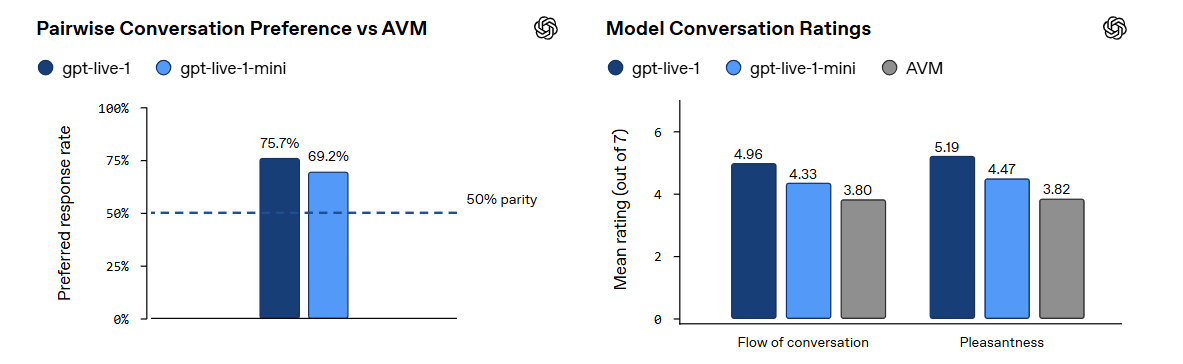
Image Credit: Open AI
Real-World Performance and Early Adopters
Two companies shared results from early access. Speak, a language learning app, reported that false interruptions during student thinking pauses dropped by nearly 80 percent compared to their previous turn-based system. That's a direct UX improvement. Students pausing to recall a word no longer get cut off by an overeager AI.
Tony Stoyanov, CTO of a medical services platform, said his team cut their codebase by 80 percent. They deleted about 23,000 lines of glue code that previously managed turn detection, interruption handling, and state synchronization. GPT-Live1 handles those concerns natively.
Yelp is using GPT-Live1 for phone-based restaurant reservations. Their CTO Alex Levy reported better call handling, but no specific metrics were shared.
Other benchmark numbers worth noting: turn-taking latency dropped from 1.4 seconds to 0.8 seconds. Tool-calling accuracy went from 60 percent to 87 percent. In a banking voice support benchmark, GPT-Live1 passed 32 percent of interactions, up from 12.4 percent for the previous model. That banking number is still low in absolute terms, but it shows the direction.
Pricing and Developer Access
The front-end voice layer costs $0.05 per minute. That works out to about $3 per hour. Backend model costs and agent tool costs are billed separately, so your total expense depends on which reasoning model you pair it with and how many tool calls you make.
For a ten-minute voice interaction, you're looking at $0.50 in voice layer costs alone. Whether that's expensive depends on your use case. A customer service line that handles thousands of calls daily will feel the cost. A language learning app where each session is a few minutes long might find it reasonable.
Developers can configure the model through system prompts. You can adjust tone, speaking speed, and conversation style. You can also wire up tools, agent frameworks, and backend models through the API. OpenAI also added twelve new voices spanning different accents, dialects, and languages: Quartz, Ripple, Vesper, Willow, Stone, Gleam, Meridian, Bossa, Tempo, Beacon, Delta, and Cinder. More voices and language support are planned for the coming months.
Phone deployment is supported. That means GPT-Live1 can handle inbound and outbound calls for things like restaurant bookings, customer support, and appointment scheduling.
Strengths and Limitations
The strengths are clear. Full-duplex conversation feels natural. Interruption handling works. Latency is down to 0.8 seconds. Tool-calling accuracy at 87 percent means the model can reliably execute actions like checking availability or booking a slot mid-conversation. The developer experience is reportedly much simpler, with teams deleting tens of thousands of lines of orchestration code.
The limitations are real too. At $0.05 per minute, high-volume call centers will rack up costs fast. The 32 percent pass rate on banking voice support benchmarks shows that complex, high-stakes financial interactions are still beyond what the model can handle reliably. Early ChatGPT users complained that the model's backchanneling ("mhm," "yeah") felt excessive, and TechCrunch noted that Hindi translation demos had a noticeable American accent. OpenAI hasn't published a full list of supported languages, saying only that it has "optimized for the most commonly used languages."
How GPT-Live1 Compares to Previous Voice AI
ChatGPT's voice technology has gone through three generations. The original Standard Voice Mode used a cascade architecture: speech-to-text, then a language model, then text-to-speech. It worked but felt slow and robotic.
Advanced Voice Mode, launched with GPT-4o in 2024, processed audio in a single model, which cut latency. But it was still turn-based. The model waited for you to stop talking before responding. If you paused for a second, it might jump in. If there was background noise, it could get confused.
GPT-Live1 is different. It's always listening while it speaks. It processes audio in both directions continuously. The architecture also separates the voice interaction layer from the reasoning layer, which means OpenAI can swap in new backend models without retraining the voice model.
Who Should Use GPT-Live1
If you're building a voice agent for customer support, scheduling, or language tutoring, GPT-Live1 is worth evaluating. The API supports phone deployment, which opens up call center use cases that older voice AI couldn't handle well. The model's tool-calling accuracy means it can actually do things during a conversation, not just talk.
For ChatGPT users on Android, the app already runs GPT-Live-1 if you have a paid subscription (Go, Plus, or Pro). Free users get GPT-Live1 mini, a lighter version. You can check your voice model in Settings under Voice. If you see a "Live" label, you're on the new model.
The technology isn't perfect. Complex domain-specific tasks still trip it up. The cost adds up at scale. But for the first time, talking to an AI feels less like operating a machine and more like having a conversation. That's the real shift here, and it's one worth trying for yourself.
If you want to try GPT-Live1 on your Android phone, download ChatGPT app on APKPure and open a voice conversation. Paid subscribers get GPT-Live1 by default; free users get GPT-Live1 mini. Open Settings, tap Voice, and check which model is listed. A "Live" label means the new model is active. As with any AI tool, keep in mind that voice conversations are processed on OpenAI's servers. Review the privacy settings in the app to control whether your conversations are saved for model improvement, and always be mindful of what you share during a voice session.

- How to Download Google Photos APK Latest Version for Android 2026
- How to Download Flipboard:Your Social Magazine APK Latest Version 4.3.64 for Android 2026
- How to Download MARVEL Strike Force: Squad RPG APK Latest Version 10.6.3 for Android 2026
 NEWS
NEWS REVIEWS
 HOWTO
HOWTO










