


What Is Siri AI? Apple's Redesigned Assistant Explained

2026-09-15
Siri AI brings personal context understanding, screen awareness, and system-level app actions to iPhone. Learn what's new in Apple's redesigned assistant for iOS 27.
Apple's Siri AI, launched with iOS 27 on September 15, 2026, is the biggest overhaul of the company's voice assistant since its debut in 2011. If you've used Siri before, you probably remember it as a decent timer-setter and weather checker. Siri AI is a different animal entirely. It understands what's on your screen, remembers your personal context across apps, and can chain actions across Mail, Calendar, Messages, and Photos without bouncing you to a web search. It's Apple's answer to ChatGPT and Google Gemini, built directly into the operating system.
What Makes Siri AI Different From the Old Siri
The old Siri was a voice command tool. You said something, it matched keywords to intents, and it returned a card or a Safari link. No memory, no context, no follow-up.
- Siri AI is built on Apple's next-generation Foundation Models, developed in partnership with Google's Gemini team. Apple says the new model, internally called Apple Foundation Models v11, approaches Gemini 3-level capability. That's a massive jump from what powered Siri a year ago.
- The old Siri couldn't hold a conversation. The new one can.
Siri AI treats each interaction as part of an ongoing dialogue. You can type or talk. You can ask follow-up questions without restating context. A dedicated Siri app keeps your conversation history, syncs it across your Apple devices through iCloud, and lets you pin important chats for later. If you start a conversation on your iPhone and switch to your iPad, the thread picks up right where you left off. The new Siri doesn't forget what you were talking about. That's a fundamental shift from the old "press and forget" model.
How Siri AI Understands Personal Context
Personal context is the feature that sets Siri AI apart from generic chatbots. Apple rebuilt the search index on iPhone so Siri can access your Mail, Messages, Photos, Files, Notes, and Calendar directly. You can ask Siri to find a restaurant recommendation a friend sent you weeks ago, and it'll actually search your messages instead of giving you a web link. Looking for a hotel confirmation code from an old email? Siri can pull that up too.
The assistant also reads what's on your screen. If you're looking at a recipe in Safari, you can ask Siri to build a shopping list from the ingredients and save it to Notes. If someone texts you an address, you can tell Siri to add it to that person's contact card. The screen-awareness feature turns Siri from a background tool into something that participates in whatever you're already doing. It's the difference between asking a question into the void and having someone look over your shoulder.
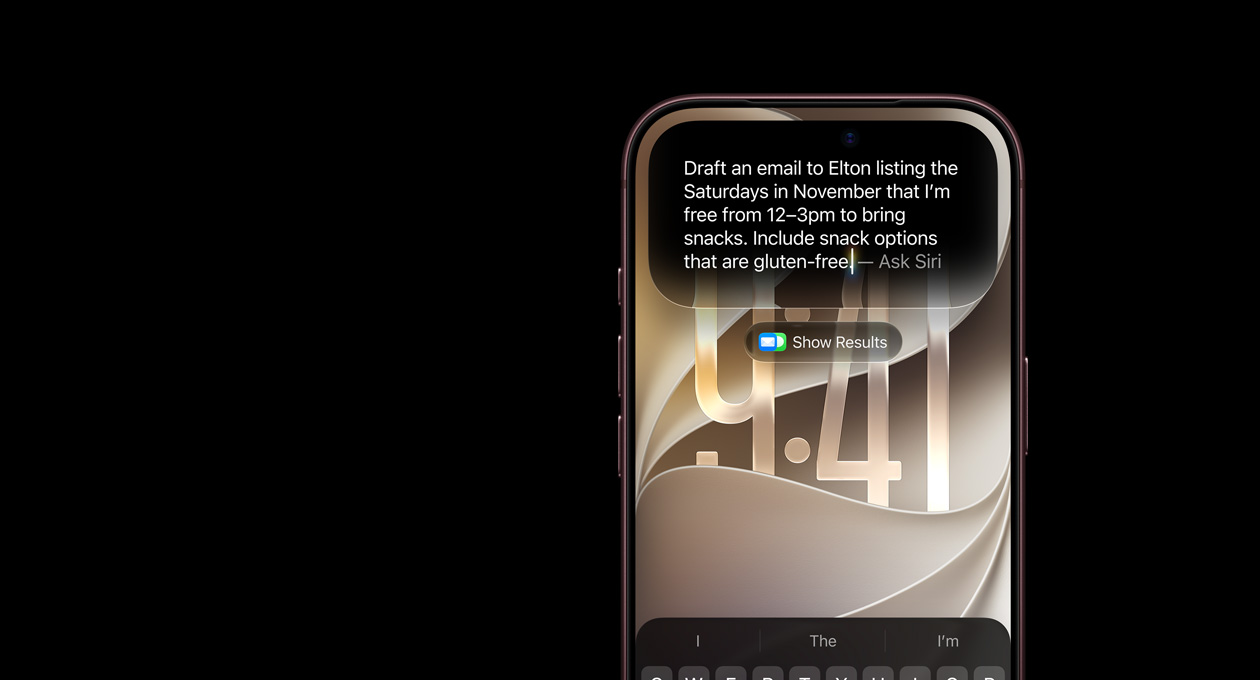
Image Credit: Apple
Siri AI Features for Cross-App Actions
Siri AI can perform multi-step operations across compatible apps. That's where the "system-level app actions" part comes in. Apple integrated Siri with its core apps through the App Intents framework, so developers can expose their app's capabilities to Siri directly.
A few things you can do:
- Pull a flight confirmation from Mail, extract the date and time, and create a Calendar event
- Take a photo, ask Siri to share it with a specific contact, and send it through Messages
- Point your iPhone's camera at a receipt, have Siri identify the items, and split the bill through Apple Cash
- Ask Siri to draft an email in your personal writing style, because it learns from how you've communicated in the past
The Write with Siri feature deserves a mention here. It works in almost any text field, not just Apple's own apps. In Messages and Mail, Siri adapts its writing tone based on your relationship with the recipient. It picks up your slang, your punctuation habits, even how you sign off. That's either impressive or slightly unsettling, depending on your perspective.
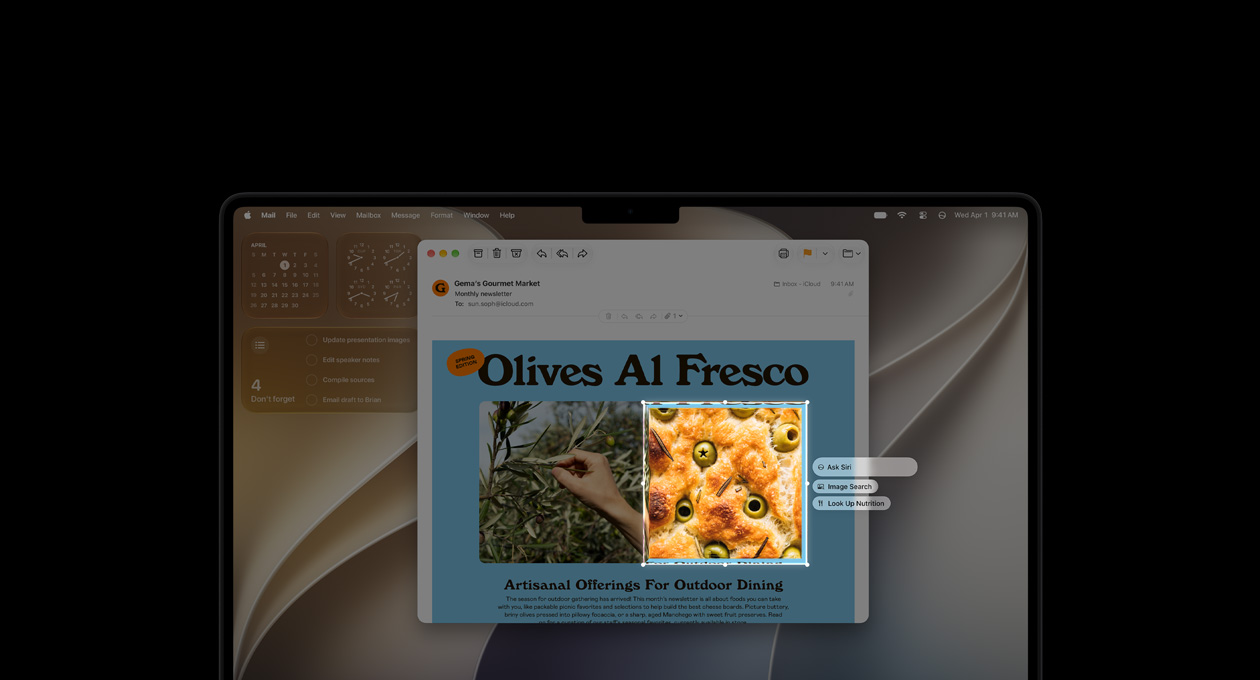
Image Credit: Apple
Visual Intelligence and Camera Integration
Apple built a Siri mode directly into the Camera app. Point your iPhone at something and ask a question. Point it at a plate of food to get nutrition information. Point it at a flyer to import event details into Calendar. Point it at a product to look up reviews. Apple calls this Visual Intelligence, and it works through a combination of on-device processing and Private Cloud Compute, Apple's encrypted cloud infrastructure. The experience moves from camera to answer without friction.
The camera integration also handles live text and document scanning. If you're at a restaurant, you can point the camera at the menu and ask Siri to recommend dishes based on your dietary preferences. Whether that recommendation is any good is another question, but the pipeline from camera to AI to answer works without much friction.

Image Credit: Apple
Apple Intelligence and the Next-Generation Model
Siri AI runs on Apple Intelligence, which Apple describes as its "personal intelligence system." The underlying models were built through a multi-year partnership with Google, reported at roughly one billion dollars per year. Apple didn't just bolt Gemini onto Siri, though. The company distilled Google's models into smaller task-specific versions that can run partly on-device and partly through Private Cloud Compute. Apple has emphasized that Google doesn't see your data, and the Gemini branding doesn't appear anywhere in the interface.
iOS 27 also expands Apple Intelligence beyond Siri. The Photos app gets a Spatial Reframing tool that lets you adjust camera perspective after shooting, an Extend tool that fills in image content beyond the original frame, and an improved Clean Up tool that can remove larger objects. Image Playground adds photorealistic output modes. Safari gets topic-based tab grouping and a Notify Me feature that watches web pages for changes. These all run on the same foundation models that power Siri.
Language Support, Availability, and Limitations
Siri AI launched in English first, specifically American English, as a beta. Apple has said it will expand to French, Japanese, Korean, Portuguese, and Spanish starting in October 2026. The rollout uses a waitlist system, similar to how Apple handled the first wave of Apple Intelligence in iOS 18. You join the queue in Settings, and Apple enables access in batches.
Here's where it gets complicated. Siri AI is not available in the European Union or mainland China. In China, iPhones sold through official channels don't support Apple Intelligence at all, which means no Siri AI regardless of which iOS version you're running. The EU situation relates to regulatory requirements around AI features and market competition that Apple hasn't resolved yet.
On hardware, Siri AI requires iPhone 15 Pro or newer. That includes the entire iPhone 16 lineup and the iPhone 17 series. Older iPhones, even those that can run iOS 27 itself, won't get Siri AI. Apple says the on-device model needs the neural engine in the A17 Pro chip or later. Mac and iPad users need at least an M1 chip. Apple Watch and Apple Vision Pro also get limited Siri AI features.
Cloud-based features have daily usage limits. Apple hasn't published exact numbers, but heavy users will hit a cap on Siri AI queries, advanced photo editing, and Image Playground. The company has indicated that paid tiers with higher limits will come later.
Privacy and Security Considerations
Apple's approach to AI privacy differs from most competitors. Siri AI processes as much as possible on-device. When it needs cloud compute, it uses Private Cloud Compute, which Apple describes as cryptographically isolated and unable to store user data permanently. The company has published security research papers detailing the architecture.
Siri's personal context access means it reads your emails, messages, photos, and files. Apple has framed this as data staying on your device, processed locally, never shared with third parties. Whether you trust that framing depends on your general stance toward Apple's privacy claims. The Google partnership adds a layer of complexity here, though Apple insists Google has no access to user data or the models running on Apple's servers.
For users in regions where Siri AI isn't available, the old Siri still works for basic tasks like setting timers, checking weather, and controlling HomeKit devices. It's just the AI-powered features that are gated.
- How to Download ONE PIECE TREASURE CRUISE-RPG APK Latest Version 16.1.6 for Android 2026
- How to Download The Weather Channel - Radar APK Latest Version 16.24.1 for Android 2026
- How to Download Lyft APK Latest Version for Android 2026
- How to Download ONE PIECE TREASURE CRUISE-RPG APK Latest Version 16.1.6 for Android 2026
- How to Download The Weather Channel - Radar APK Latest Version 16.24.1 for Android 2026
- How to Download Lyft APK Latest Version for Android 2026
What Siri AI Means for Everyday Users
Siri AI closes a gap that's been widening since ChatGPT launched in 2022. For years, iPhone users watched Android phones and third-party apps deliver AI experiences that Siri couldn't match. The redesigned assistant in iOS 27 changes that, at least for people with compatible hardware and in the right regions.
The personal context feature is the standout. Generic AI assistants can write emails and summarize documents, but they can't search your messages for a specific recommendation from a friend. Siri AI can, because it lives inside your phone's operating system with access to your apps. That integration is Apple's real advantage here, not raw model capability.
Bottom Line
If you're on an iPhone 15 Pro or newer, you get Siri AI for free with iOS 27. Install it through Settings > General > Software Update. The feature set is still in beta, language support is limited, and daily usage caps mean you can't replace ChatGPT entirely. But as a first-gen product that was two years late, it's worth trying. The foundation is solid. Whether Apple builds on it fast enough to keep pace with Google and OpenAI is the real question.
 NEWS
NEWS REVIEWS
 HOWTO
HOWTO










